---
title: "Optimization problems"
format:
html:
code-fold: true
toc: true
theme: cosmo
jupyter: python3
filters:
- shinylive
---
Most experimental campaigns have the same shape: a target (e.g. reaction yield, selectivity, process efficiency) depends on a handful of knobs such as temperature, time, concentrations, additives, or composition. The goal is to find the setting of those knobs that leads to the best target value.
Optimizing these experimental objective functions can be very challenging as they frequently have the following characteristics:
- expensive to evaluate (each run costs time and material)
- no known mathematical expression (a black box)
- no available gradient
- multiple local optima
- high levels of noise
Earlier chapters discussed other optimization problems (e.g. model training or quantum chemistry) where gradients are available and make the search efficient. This chapter covers tools for this more challenging setting.
## Design of Experiments (DoE)
DoE is the most established optimization framework in industry and remains a practical default for chemists. A campaign has three stages:
1. **Factor screening**: identify which factors (features) actually matter and drop the rest.
2. **Optimization**: map the response over the important factors to locate the best setting.
3. **Robustness**: check that the outcome is stable against small changes in the factors.
One factor at a time (OFAT) is the naive alternative to DoE which optimizes each factor separately:
- fix everything but one factor
- optimize this one factor
- move to the next factor
OFAT **ignores interactions** between factors, and the problem worsens as the number of factors grows.
### The mathematics of DoE
DoE instead places experiments on a deliberate grid. Each factor is coded to levels covering its range, e.g. $-1$ (low), $0$ (center), $+1$ (high). A polynomial model is then fitted to the measured responses,
$$
\begin{aligned}
\text{response} \;=\; \beta_0
&\;+\; \underbrace{\textstyle\sum_i \beta_i x_i}_{\text{main effects}}
\;+\; \underbrace{\textstyle\sum_{i<j} \beta_{ij} x_i x_j}_{\text{interactions}} \\[2pt]
&\;+\; \underbrace{\textstyle\sum_i \beta_{ii} x_i^2}_{\text{curvature}}
\;+\; \varepsilon ,
\end{aligned}
$$
where the interaction terms $x_i x_j$ are exactly what OFAT cannot see.
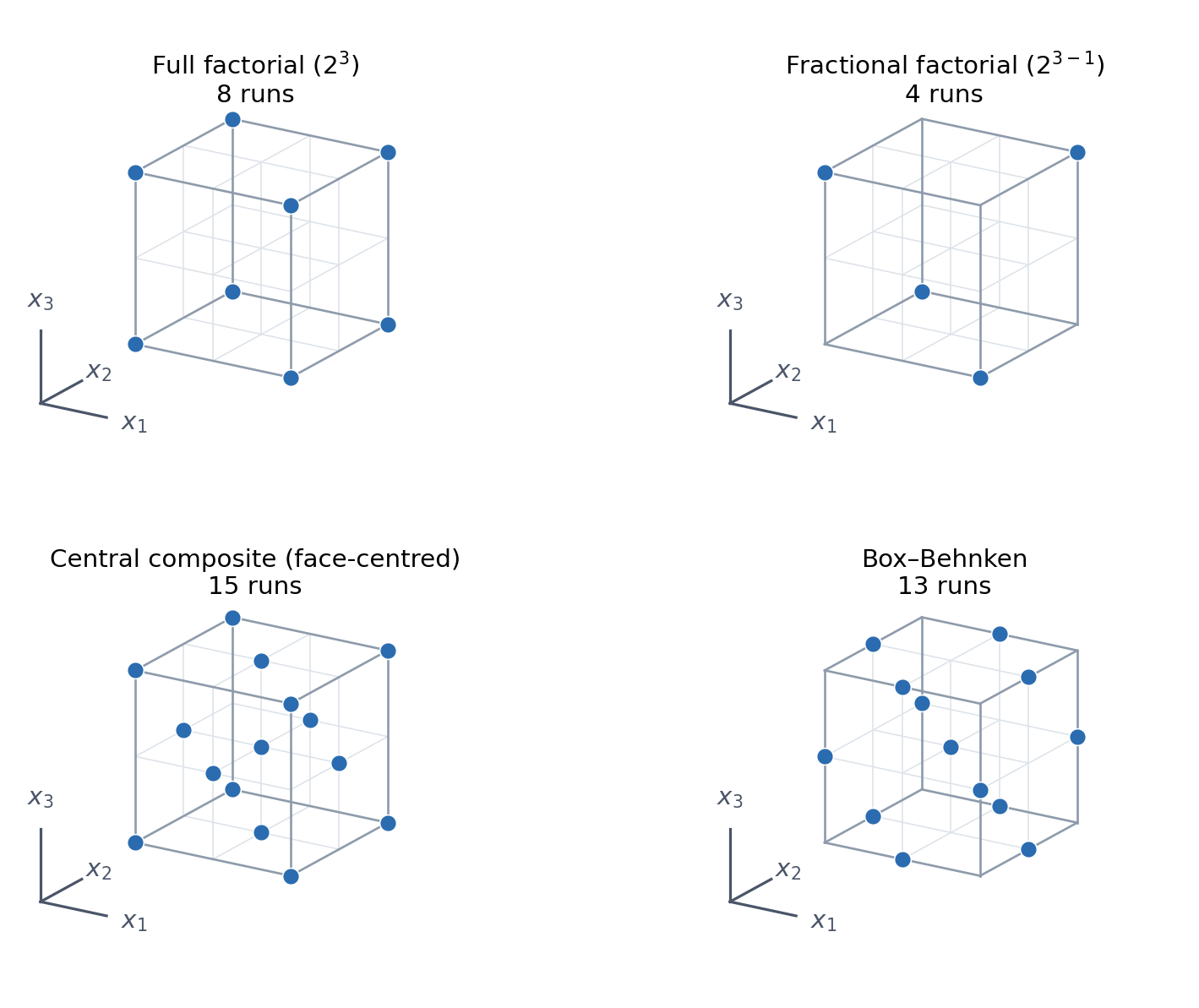
Depending on the goal, you choose a design which can fit some of the interaction terms, as illustrated here:
```{python}
#| label: doe-designs
#| fig-cap: "Common designs for three factors. The two factorial designs use only the corners (two levels per factor); the fractional one keeps half of them, trading the ability to resolve some interactions for half the runs. Central composite and Box–Behnken add interior points to give a third level, which is what makes the quadratic curvature terms fittable."
import itertools
import numpy as np
import matplotlib.pyplot as plt

CORNERS = np.array(list(itertools.product([-1, 1], repeat=3)))

# half fraction defined by the generator x3 = x1 x2: keep the corners with x1*x2*x3 = +1
HALF = CORNERS[CORNERS.prod(axis=1) == 1]
FACES = np.array([[s * (i == j) for j in range(3)] for i in range(3) for s in (-1, 1)])
EDGES = np.array([p for p in itertools.product([-1, 0, 1], repeat=3)
                  if list(p).count(0) == 1])
CENTRE = np.zeros((1, 3))

DESIGNS = [
    ("Full factorial ($2^3$)", CORNERS),
    ("Fractional factorial ($2^{3-1}$)", HALF),
    ("Central composite (face-centred)", np.vstack([CORNERS, FACES, CENTRE])),
    ("Box–Behnken", np.vstack([EDGES, CENTRE])),
]
BLUE, WIRE, GRID = "#2b6cb0", "#8e9bab", "#dde3ea"
BOXES = [(0.02, 0.50, 0.46, 0.46), (0.52, 0.50, 0.46, 0.46),
         (0.02, 0.02, 0.46, 0.46), (0.52, 0.02, 0.46, 0.46)]

fig = plt.figure(figsize=(8.5, 6.4))
for n, (title, pts) in enumerate(DESIGNS, start=1):
    ax = fig.add_axes(BOXES[n - 1], projection="3d")
    ax.set_proj_type("ortho")                 # isometric: no perspective distortion
    ax.view_init(elev=20, azim=-58)
    ax.set_axis_off()
    ax.set_box_aspect((1, 1, 1))

    # lattice at the three levels -1/0/+1: outer lines are the cube edges, inner ones the grid
    for d in range(3):
        for u, v in itertools.product([-1, 0, 1], repeat=2):
            a, b = np.empty(3), np.empty(3)
            others = [i for i in range(3) if i != d]
            a[others], b[others] = (u, v), (u, v)
            a[d], b[d] = -1, 1
            edge = abs(u) == 1 and abs(v) == 1
            ax.plot(*zip(a, b), color=WIRE if edge else GRID,
                    lw=1 if edge else 0.6, zorder=2 if edge else 0)

    ax.scatter(*pts.T, s=55, c=BLUE, edgecolors="white", linewidths=0.6,
               depthshade=False, zorder=5)

    o = np.array([-1.75, -1.75, -1.6])                # axis triad, clear of the cube
    for d, lab in enumerate(("$x_1$", "$x_2$", "$x_3$")):
        e = o.copy(); e[d] += 0.85
        ax.plot(*zip(o, e), color="#4a5568", lw=1.2)
        t = o.copy(); t[d] += 1.2
        ax.text(*t, lab, fontsize=11, ha="center", va="center", color="#4a5568")

    x0, y0, w, h = BOXES[n - 1]
    fig.text(x0 + w / 2, y0 + h * 0.93, f"{title}\n{len(pts)} runs",
             ha="center", va="top", fontsize=11)
    lim = 1.55
    ax.set_xlim(-lim, lim); ax.set_ylim(-lim, lim); ax.set_zlim(-lim, lim)

plt.show()
```
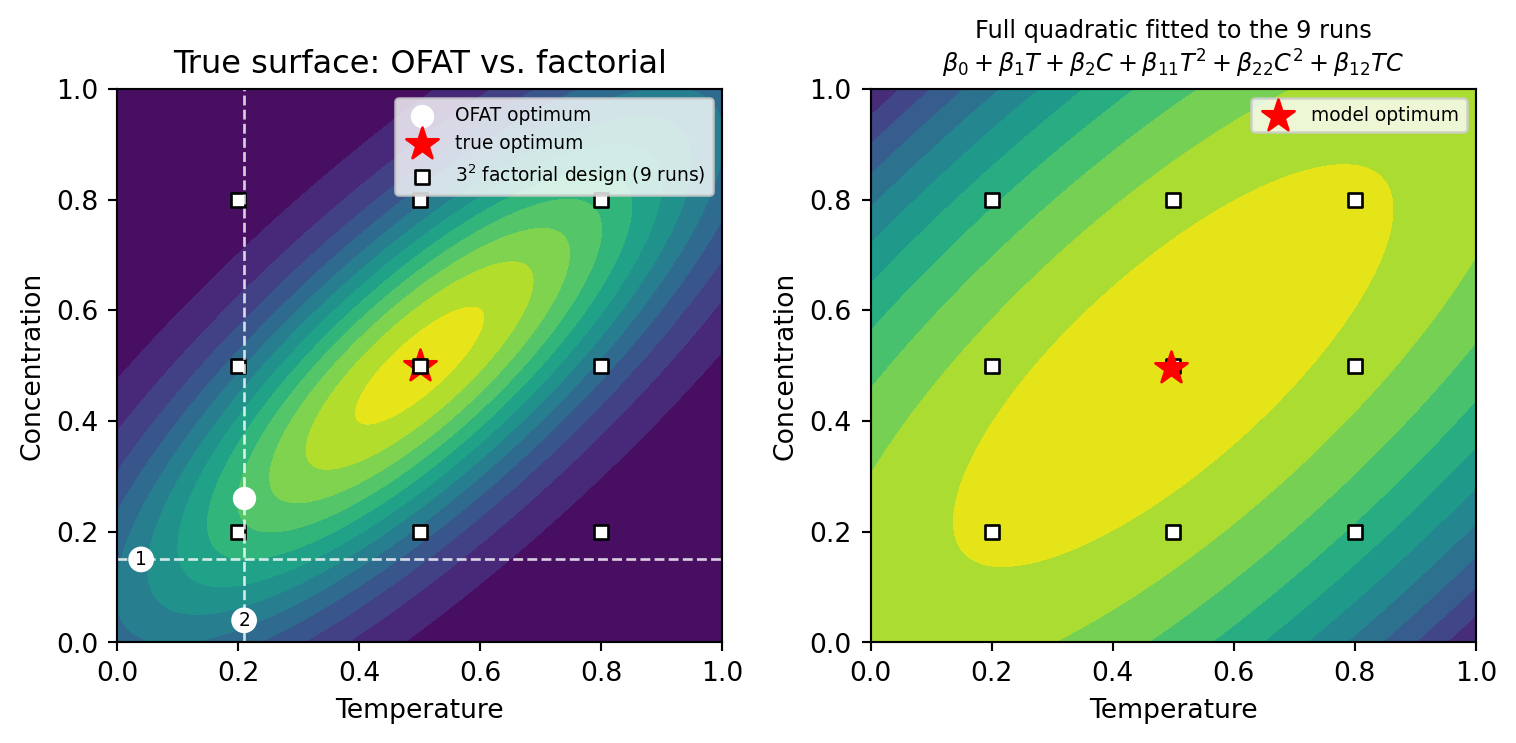
The figure below contrasts OFAT with a factorial design on a two-factor yield surface whose optimum lies on a diagonal ridge. OFAT optimizes temperature first, at a fixed low concentration, and then optimizes concentration at that temperature. As the ridge runs diagonally, both scans cut across it and the search stalls well short of the optimum. The $3^2$ full factorial instead spreads nine runs over the whole region, the full quadratic model fitted to them recovers the optimum.
```{python}
#| label: ofat-vs-doe
#| fig-cap: "Left: a diagonal-ridge yield surface. The dashed lines are the two OFAT scans — (1) $T$ at fixed $C = 0.15$, then (2) $C$ at the best $T = 0.21$ — which stall off the ridge; the $3^2$ full factorial (squares) covers the whole region. Right: the full quadratic model fitted to those nine runs. Its optimum coincides with the true one, though its contours are too broad."
import numpy as np
import matplotlib.pyplot as plt

# true response surface: an anisotropic peak rotated onto the diagonal (T and C interact)
def yield_fn(T, C):
    u, v = T - 0.5, C - 0.5
    a, b = (u + v) / np.sqrt(2), (u - v) / np.sqrt(2)
    return np.exp(-(a**2 / 0.5 + b**2 / 0.05))

g = np.linspace(0, 1, 120)
TT, CC = np.meshgrid(g, g)
Z = yield_fn(TT, CC)

# OFAT: step 1 holds C at its starting value and scans T; step 2 fixes the best T and scans C
C0 = 0.15
Tstar = g[yield_fn(g, np.full_like(g, C0)).argmax()]
Cstar = g[yield_fn(np.full_like(g, Tstar), g).argmax()]

# 3-level full factorial: every combination of 3 levels in 2 factors = 3^2 = 9 runs
levels = [0.2, 0.5, 0.8]
Td, Cd = np.meshgrid(levels, levels)
Td, Cd = Td.ravel(), Cd.ravel()
yd = yield_fn(Td, Cd)

# full quadratic model: intercept, both main effects, both curvatures, and the T*C interaction
def feats(T, C):
    return np.c_[np.ones_like(T), T, C, T**2, C**2, T * C]
coef, *_ = np.linalg.lstsq(feats(Td, Cd), yd, rcond=None)
Zfit = (feats(TT.ravel(), CC.ravel()) @ coef).reshape(TT.shape)
imax = np.unravel_index(Zfit.argmax(), Zfit.shape)      # optimum predicted by the model

fig, (ax1, ax2) = plt.subplots(1, 2, figsize=(8, 4))
ax1.contourf(TT, CC, Z, levels=12, cmap="viridis")
ax1.axhline(C0, ls="--", lw=1, color="white", alpha=0.8)      # step 1 scans T at fixed C
ax1.axvline(Tstar, ls="--", lw=1, color="white", alpha=0.8)   # step 2 scans C at the best T
badge = dict(boxstyle="circle,pad=0.18", fc="white", ec="none")           # step markers
ax1.text(0.04, C0, "1", color="black", fontsize=7, ha="center", va="center", bbox=badge)
ax1.text(Tstar, 0.04, "2", color="black", fontsize=7, ha="center", va="center", bbox=badge)
ax1.scatter([Tstar], [Cstar], c="white", marker="o", s=60, label="OFAT optimum")
ax1.scatter([0.5], [0.5], c="red", marker="*", s=160, label="true optimum")
ax1.scatter(Td, Cd, c="white", marker="s", s=30, edgecolors="black",
            label="$3^2$ factorial design (9 runs)")
ax1.set_title("True surface: OFAT vs. factorial")
ax1.set_xlabel("Temperature"); ax1.set_ylabel("Concentration")
ax1.legend(fontsize=7, loc="upper right")

ax2.contourf(TT, CC, Zfit, levels=12, cmap="viridis")
ax2.scatter(Td, Cd, c="white", marker="s", s=30, edgecolors="black")
ax2.scatter([g[imax[1]]], [g[imax[0]]], c="red", marker="*", s=160, label="model optimum")
ax2.set_title("Full quadratic fitted to the 9 runs\n"
              r"$\beta_0+\beta_1 T+\beta_2 C+\beta_{11}T^2+\beta_{22}C^2+\beta_{12}TC$",
              fontsize=9)
ax2.set_xlabel("Temperature"); ax2.set_ylabel("Concentration")
ax2.legend(fontsize=7, loc="upper right")
for ax in (ax1, ax2):
    ax.set_xlim(0, 1); ax.set_ylim(0, 1)
fig.tight_layout()
plt.show()
```
DoE is powerful but commits to its whole batch up front. When experiments are expensive and can be run sequentially, it pays to choose the *next* experiment using everything measured so far. That requires a model that also reports how uncertain it is.
## Gaussian process regression (GPR)
A **Gaussian process** is a model that predicts not a single number but a Gaussian distribution at every input. That uncertainty is what later lets an optimizer reason about where it is worth gathering data.
The full theory is complicated, so it is built up here in stages: first the idea of model uncertainty, then **Bayesian linear regression**, and finally the extension to functions.
### Model uncertainty
A useful model separates two sources of error:
- **Epistemic (reducible)** uncertainty comes from having too little data to pin down the model. It is large where no data has been collected and **shrinks as data is added**.
- **Aleatoric (irreducible)** uncertainty is the measurement noise itself. Gathering more data does not remove it.
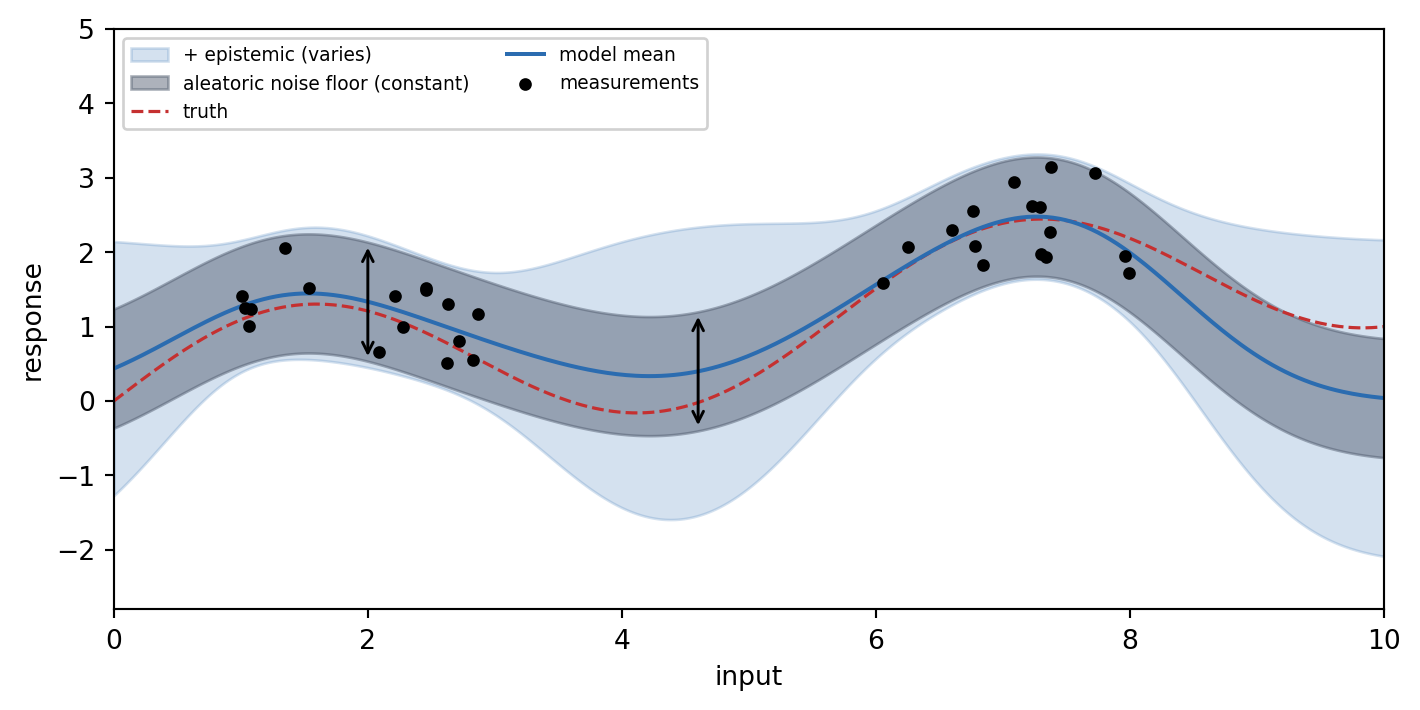
A GPR reports both. Close to previous observations, the epistemic part collapses and only the noise floor remains, while far from any data the predictions fan out.
```{python}
#| label: epistemic-vs-aleatoric
#| fig-cap: "The two sources of error, separated. The grey band is the noise floor: the two arrows are equally tall, one where measurements are dense and one in the empty gap, and the band has the same height everywhere in between. The blue collar around it is the epistemic part, which is squeezed flat wherever measurements pin the model down and increases in the gap and past the last data point."
import numpy as np
import matplotlib.pyplot as plt

rng = np.random.default_rng(0)
f = lambda x: np.sin(1.1 * x) + 0.2 * x            # the unknown truth
sigma = 0.4                                        # measurement noise (aleatoric)

# measurements cluster in two regions, leaving a gap in the middle and nothing at the edges
X = np.concatenate([rng.uniform(1.0, 3.0, 16), rng.uniform(6.0, 8.0, 16)])
y = f(X) + rng.normal(0, sigma, X.size)
xs = np.linspace(0, 10, 400)

# textbook GP posterior with an RBF kernel: a few lines of numpy, no extra dependency
k = lambda a, b, l=1.0: np.exp(-((a[:, None] - b[None, :]) ** 2) / (2 * l**2))
K = k(X, X) + sigma**2 * np.eye(X.size)
Ks = k(xs, X)
mu = Ks @ np.linalg.solve(K, y)
epistemic = np.sqrt(np.clip(1.0 - np.sum(Ks * np.linalg.solve(K, Ks.T).T, axis=1), 0, None))
total = np.sqrt(epistemic**2 + sigma**2)

fig, ax = plt.subplots(figsize=(7.5, 3.8))
ax.fill_between(xs, mu - 2 * total, mu + 2 * total, color="#2b6cb0", alpha=0.20,
                label="+ epistemic (varies)")
ax.fill_between(xs, mu - 2 * sigma, mu + 2 * sigma, color="#4a5568", alpha=0.45,
                label="aleatoric noise floor (constant)")
ax.plot(xs, f(xs), color="#c53030", lw=1.2, ls="--", label="truth")
ax.plot(xs, mu, color="#2b6cb0", lw=1.5, label="model mean")
ax.scatter(X, y, c="black", s=14, zorder=5, label="measurements")

# the noise floor is the same height with or without measurements underneath it
for x0 in (2.0, 4.6):
    i = np.abs(xs - x0).argmin()
    ax.annotate("", (x0, mu[i] - 2 * sigma), (x0, mu[i] + 2 * sigma),
                arrowprops=dict(arrowstyle="<->", color="black", lw=1.1))
ax.set_xlabel("input"); ax.set_ylabel("response")
ax.legend(fontsize=7, loc="upper left", ncol=2, framealpha=0.9)
ax.set_xlim(0, 10); ax.set_ylim(-2.8, 5.0)
fig.tight_layout()
plt.show()
```
### Bayesian linear regression (BLR)
Bayesian methods update a **prior** belief about the world based on evidence to obtain a **posterior** belief.
Bayes' theorem formalizes this update: the posterior is the prior weighted by the **likelihood** of the observed evidence under each set of parameters, and renormalized:
$$
\underbrace{p(\mathbf{w}\mid\mathcal{D})}_{\text{posterior}} \;=\; \frac{\overbrace{p(\mathcal{D}\mid\mathbf{w})}^{\text{likelihood}}\;\overbrace{p(\mathbf{w})}^{\text{prior}}}{\underbrace{\int p(\mathcal{D}\mid\mathbf{w}) \;p(\mathbf{w}) \;d\mathbf{w}}_{\text{normalization}}}
$$
Dropping the constant normalization, BLR starts from a prior belief about the model parameters and updates it into a **posterior** as data arrives:
$$
\underbrace{p(\mathbf{w}\mid\mathcal{D})}_{\text{posterior}} \;\propto\; \underbrace{p(\mathcal{D}\mid\mathbf{w})}_{\text{likelihood}}\;\underbrace{p(\mathbf{w})}_{\text{prior}} .
$$
For a straight line $y = w_0 + w_1 x$, the parameters are the two weights. The prior says both weights are probably near zero; each observed point reshapes the belief, ruling out lines that miss it. The posterior over the weights tightens around the true line, and the posterior from one round becomes the prior for the next.
The widget below makes this concrete. The **left panel** is the posterior distribution over the two weights $(w_0, w_1)$, with the true weights marked. The **right panel** draws lines sampled from that posterior together with the data seen so far. Moving the slider adds observations one at a time: the weight cloud contracts toward the true value, and the sampled lines collapse onto the data.
```{shinylive-python}
#| standalone: true
#| viewerHeight: 480
from shiny import App, render, ui
import numpy as np
import matplotlib.pyplot as plt
import matplotlib
matplotlib.rcParams.update({
"font.family": "serif",
"figure.facecolor": "#fafaf7",
"axes.facecolor": "#fafaf7",
})
# fixed dataset generated by a known line plus noise
rng = np.random.default_rng(0)
true_w = np.array([-0.3, 0.5]) # w0 (intercept), w1 (slope)
N = 20
xs = rng.uniform(-1, 1, N) # unsorted: observations arrive in random order
noise = 0.2
ys = true_w[0] + true_w[1] * xs + rng.normal(0, noise, N)
alpha, beta = 2.0, 1 / noise**2 # prior precision, likelihood precision
def posterior(n):
if n == 0:
return np.zeros(2), np.eye(2) / alpha # the prior
Phi = np.c_[np.ones(n), xs[:n]]
S = np.linalg.inv(alpha * np.eye(2) + beta * Phi.T @ Phi)
m = beta * S @ Phi.T @ ys[:n]
return m, S
app_ui = ui.page_fluid(
ui.input_slider("n", "Number of observations", min=0, max=N, value=0, step=1),
ui.output_plot("plot"),
)
def server(input, output, session):
@output
@render.plot
def plot():
n = input.n()
m, S = posterior(n)
fig, (axw, axd) = plt.subplots(1, 2, figsize=(9, 4))
# left: posterior density over the two weights
w0 = np.linspace(-1, 1, 120); w1 = np.linspace(-1, 1, 120)
W0, W1 = np.meshgrid(w0, w1)
pos = np.dstack([W0, W1]) - m
dens = np.exp(-0.5 * np.einsum("...i,ij,...j->...", pos, np.linalg.inv(S), pos))
axw.contourf(W0, W1, dens, levels=12, cmap="viridis")
axw.scatter([true_w[0]], [true_w[1]], marker="+", c="white", s=120)
axw.set_title("Posterior over weights")
axw.set_xlabel("$w_0$"); axw.set_ylabel("$w_1$")
# right: lines sampled from the posterior, plus data seen so far
xline = np.array([-1, 1])
samp = np.random.default_rng(1).multivariate_normal(m, S, size=8)
for w in samp:
axd.plot(xline, w[0] + w[1] * xline, color="#e8833a", lw=0.8, alpha=0.6)
axd.plot(xline, true_w[0] + true_w[1] * xline, "k--", lw=1.5, label="true line")
if n > 0:
axd.scatter(xs[:n], ys[:n], c="#2b6cb0", s=25, zorder=5, label="observations")
axd.set_xlim(-1, 1); axd.set_ylim(-1.5, 1.5)
axd.set_title("Sampled lines")
axd.set_xlabel("$x$"); axd.set_ylabel("$y$")
axd.legend(fontsize=8, loc="upper left")
fig.tight_layout()
return fig
app = App(app_ui, server)
```
BLR predictions can leverage the full posterior distribution over the weights to predict a distribution of target values.
A conventional linear regression keeps only the mean weights to construct a single line. BLR additionally carries the variance of the weights, which yields a predictive distribution whose uncertainty combines measurement noise and weight uncertainty.
### From lines to functions
A GPR is the same idea lifted from "a distribution over lines" to "a distribution over functions". Instead of placing a prior on two weights, it places a prior directly on the function values. Collecting the values $f(\mathbf{x})$ at the inputs into a vector, the prior is a single multivariate Gaussian with zero mean and a covariance given entirely by the **kernel matrix** $\mathbf{K}$ (the Gram matrix, $K_{ij} = k(x_i, x_j)$):
$$
p\big(f(\mathbf{x})\big) = \mathcal{N}\big(f(\mathbf{x}) \mid \mathbf{0},\; \mathbf{K}\big) .
$$
The kernel $k(x, x')$ sets how strongly two inputs are correlated; the zero mean is the usual (but not required) convention. Each observation adds Gaussian measurement noise of precision $\beta$ on top of the function, corresponding to the likelihood
$$
p(\mathbf{y} \mid f(\mathbf{x}), \beta) = \mathcal{N}\big(\mathbf{y} \mid f(\mathbf{x}),\; \beta^{-1}\mathbf{I}\big) .
$$
Conditioning this joint Gaussian on the observed data gives, for a new input $x_{n+1}$, the **predictive distribution**, which is again a Gaussian with closed-form mean and variance,
$$
p(y_{n+1} \mid \mathbf{y}, \mathbf{x}, x_{n+1}) = \mathcal{N}\Big(y_{n+1} \;\Big|\; \underbrace{\mathbf{k}^\top \mathbf{C}_n^{-1}\mathbf{y}}_{\text{mean}},\; \underbrace{c - \mathbf{k}^\top \mathbf{C}_n^{-1}\mathbf{k}}_{\text{variance}}\Big) ,
$$
where
$$
\mathbf{k} = \big[k(x_1, x_{n+1}), \dots, k(x_n, x_{n+1})\big]^\top , \qquad
c = k(x_{n+1}, x_{n+1}) + \beta^{-1} , \qquad
\big(\mathbf{C}_n\big)_{ij} = k(x_i, x_j) + \beta^{-1}\delta_{ij} .
$$
The covariance matrix $\mathbf{C}_n$ is just the kernel matrix with the noise variance $\beta^{-1}$ added on the diagonal. The mean $\mathbf{k}^\top \mathbf{C}_n^{-1}\mathbf{y}$ is a weighted sum of the kernel similarities $\mathbf{k}$ to the training points (exactly the form of [kernel ridge regression](07_non_linear_models.qmd#kernel-ridge-regression)) while the variance shrinks near observations and grows far from them. Its square root is the predictive standard deviation $\sigma(x)$, drawn as the $\pm 2\sigma(x)$ band in the widget below.
The kernel encodes the assumed smoothness. The most common choices are the **squared-exponential (RBF)** and **Matérn** kernels (the same [kernel functions](07_non_linear_models.qmd#important-kernel-functions) as introduced before).
Kernel hyperparameters are normally tuned automatically by maximizing the data likelihood during training.
### Training a GPR
Training means conditioning the prior (mean and kernel function) on observations. The widget below shows a GPR fitted to points sampled from an unknown function, using the **squared-exponential (RBF)** kernel
$$
k(x, x') = e^{-\frac{(x - x')^2}{2\ell^2}} ,
\qquad \sigma_n^2 = \beta^{-1} = (0.05)^2 \ \text{(fixed)} .
$$
The **number of observations** slider conditions on more data. The GPR's uncertainty is shown as the shaded $\pm 2\sigma(x)$ band. The **length scale $\ell$** slider changes the kernel hyperparameter which controls how far the correlation between two inputs reaches.
```{shinylive-python}
#| standalone: true
#| viewerHeight: 480
from shiny import App, render, ui
import numpy as np
import matplotlib.pyplot as plt
import matplotlib
matplotlib.rcParams.update({
"font.family": "serif",
"figure.facecolor": "#fafaf7",
"axes.facecolor": "#fafaf7",
})
f = lambda x: np.sin(3 * x) + 0.5 * np.sin(7 * x) # the unknown target
pool_x = np.array([0.5, -0.8, 1.7, 0.1, 1.3, -0.4, 1.9, 0.9]) # used in order: not left to right
pool_y = f(pool_x)
grid = np.linspace(-1, 2, 200)
noise = 0.05
def rbf(a, b, ls):
d = a[:, None] - b[None, :]
return np.exp(-0.5 * (d / ls) ** 2)
def gpr(n, ls):
if n == 0:
return np.zeros(len(grid)), np.ones(len(grid)) # prior: mean 0, sd 1
Xtr, ytr = pool_x[:n], pool_y[:n]
K = rbf(Xtr, Xtr, ls) + noise**2 * np.eye(n)
Kinv = np.linalg.inv(K)
Ks = rbf(Xtr, grid, ls)
mu = Ks.T @ Kinv @ ytr
cov = rbf(grid, grid, ls) - Ks.T @ Kinv @ Ks
return mu, np.sqrt(np.clip(np.diag(cov), 0, None))
app_ui = ui.page_fluid(
ui.input_slider("n", "Number of observations", min=0, max=len(pool_x), value=0, step=1),
ui.input_slider("ls", "Length scale ℓ", min=0.1, max=1.0, value=0.4, step=0.05),
ui.output_plot("plot"),
)
def server(input, output, session):
@output
@render.plot
def plot():
n, ls = input.n(), input.ls()
mu, sd = gpr(n, ls)
fig, ax = plt.subplots(figsize=(9, 4))
ax.plot(grid, f(grid), "k:", lw=1, alpha=0.5, label="true function")
ax.fill_between(grid, mu - 2 * sd, mu + 2 * sd, color="#2b6cb0", alpha=0.2,
label="$\\pm 2\\sigma$")
ax.plot(grid, mu, color="#2b6cb0", lw=2, label="GPR mean")
if n > 0:
ax.scatter(pool_x[:n], pool_y[:n], c="#e8833a", s=40, zorder=5, label="observations")
ax.set_ylim(-2.2, 2.2)
ax.set_xlabel("$x$"); ax.set_ylabel("$y$")
ax.legend(fontsize=8, loc="upper right", ncol=2)
fig.tight_layout()
return fig
app = App(app_ui, server)
```
Training inverts the $n \times n$ covariance matrix, so the cost grows as $\sim n^3$ with the number of observations. That rules GPR out for very large datasets, but leaves it a good choice for experimental campaigns of up to a few thousand measurements.
## Bayesian optimization (BO)
Bayesian optimization uses a GPR surrogate to optimize a black-box objective in as few evaluations as possible. The loop is [@Garnett_2023; @Shields_2021]:
1. Fit a GPR surrogate to the data gathered so far.
2. Use an **acquisition function** to pick the most promising next point.
3. Measure new data, add the result, and repeat until satisfied.
### Acquisition functions
The acquisition function turns the surrogate's mean and uncertainty into a single score for how much each point is worth measuring. The point where that score is largest is the one chosen for the next experiment. The score must balance two competing goals:
- **Exploitation** = sample where the predicted mean is already high (low risk, modest reward).
- **Exploration** = sample where the uncertainty leaves the best chance of measuring a new best value (high risk, high reward).
The **Upper Confidence Bound (UCB)** makes the trade-off explicit,
$$
\alpha_{\text{UCB}}(x) = \mu(x) + \kappa\,\sigma(x) ,
$$
where $\kappa$ is the exploration weight: it sets how much of the plausible upside above the mean is counted. With small $\kappa$ the score is essentially the predicted mean, so the next experiment goes wherever the surrogate currently believes the optimum lies, however shaky that belief; larger $\kappa$ also rewards points whose uncertainty could still carry them past it. **Expected Improvement (EI)** is another common choice, with a parameter $\epsilon$ playing a similar role: larger $\epsilon$ explores more and learns the whole function more evenly, smaller $\epsilon$ exploits and risks getting stuck in a local optimum.
### BO in action
The widget below runs BO on a 1D objective. The **top panel** shows the GPR surrogate (mean and $\pm 2\sigma(x)$) over the true function with the points gathered so far; the **bottom panel** shows the UCB acquisition function, whose maximum (marked) selects the next point to measure. The **iteration** slider replays the campaign step by step; the **exploration $\kappa$** slider changes the strategy and restarts the run — low $\kappa$ clusters samples around the first peak it finds, high $\kappa$ spreads them out to map the whole domain first.
```{shinylive-python}
#| standalone: true
#| viewerHeight: 560
from shiny import App, render, ui, reactive
import numpy as np
import matplotlib.pyplot as plt
import matplotlib
matplotlib.rcParams.update({
"font.family": "serif",
"figure.facecolor": "#fafaf7",
"axes.facecolor": "#fafaf7",
})
f = lambda x: np.sin(3 * x) + 0.5 * np.sin(7 * x) # black-box objective to maximize
grid = np.linspace(-1, 2, 200)
ls, noise = 0.4, 0.05
MAXIT = 10
TOL = 0.08 # min spacing between measurements
def rbf(a, b):
d = a[:, None] - b[None, :]
return np.exp(-0.5 * (d / ls) ** 2)
def gpr(Xtr, ytr):
K = rbf(Xtr, Xtr) + noise**2 * np.eye(len(Xtr))
Kinv = np.linalg.inv(K)
Ks = rbf(Xtr, grid)
mu = Ks.T @ Kinv @ ytr
cov = rbf(grid, grid) - Ks.T @ Kinv @ Ks
return mu, np.sqrt(np.clip(np.diag(cov), 0, None))
def history(kappa):
# replay the full campaign: deterministic given kappa
obs = [-0.8, 1.7] # two initial points
steps = []
for _ in range(MAXIT):
ox = np.array(obs); oy = f(ox)
mu, sd = gpr(ox, oy)
acq = mu + kappa * sd
# the acquisition peak can sit on an already-measured point, which would freeze
# the campaign; skip anything within TOL of an existing observation
free = np.where(np.abs(grid[:, None] - ox[None, :]).min(axis=1) < TOL, -np.inf, acq)
xn = float(grid[free.argmax()])
steps.append((ox.copy(), mu, sd, acq, xn))
obs.append(xn)
return steps
app_ui = ui.page_fluid(
ui.input_slider("kappa", "Exploration κ", min=0.0, max=3.0, value=1.5, step=0.25),
ui.input_slider("it", "Iteration", min=1, max=MAXIT, value=1, step=1),
ui.output_plot("plot"),
)
def server(input, output, session):
@reactive.effect
@reactive.event(input.kappa)
def _reset():
ui.update_slider("it", value=1) # restart the replay when the strategy changes
@output
@render.plot
def plot():
kappa = input.kappa()
steps = history(kappa)
ox, mu, sd, acq, xn = steps[input.it() - 1]
fig, (ax1, ax2) = plt.subplots(2, 1, figsize=(9, 5), sharex=True,
gridspec_kw={"height_ratios": [3, 1]})
ax1.plot(grid, f(grid), "k:", lw=1, alpha=0.5, label="true objective")
ax1.fill_between(grid, mu - 2 * sd, mu + 2 * sd, color="#2b6cb0", alpha=0.2)
ax1.plot(grid, mu, color="#2b6cb0", lw=2, label="GPR mean")
ax1.scatter(ox, f(ox), c="#e8833a", s=40, zorder=5, label="observations")
ax1.axvline(xn, color="#38a169", ls="--", lw=1.5)
ax1.set_ylabel("$f(x)$"); ax1.legend(fontsize=8, loc="upper right", ncol=3)
ax2.fill_between(grid, acq, acq.min(), color="#38a169", alpha=0.3)
ax2.plot(grid, acq, color="#38a169", lw=1.5)
ax2.axvline(xn, color="#38a169", ls="--", lw=1.5)
ax2.scatter([xn], [acq.max()], color="#38a169", s=60, zorder=5)
ax2.set_ylabel("UCB"); ax2.set_xlabel("$x$")
fig.tight_layout()
return fig
app = App(app_ui, server)
```
## Multi-objective optimization
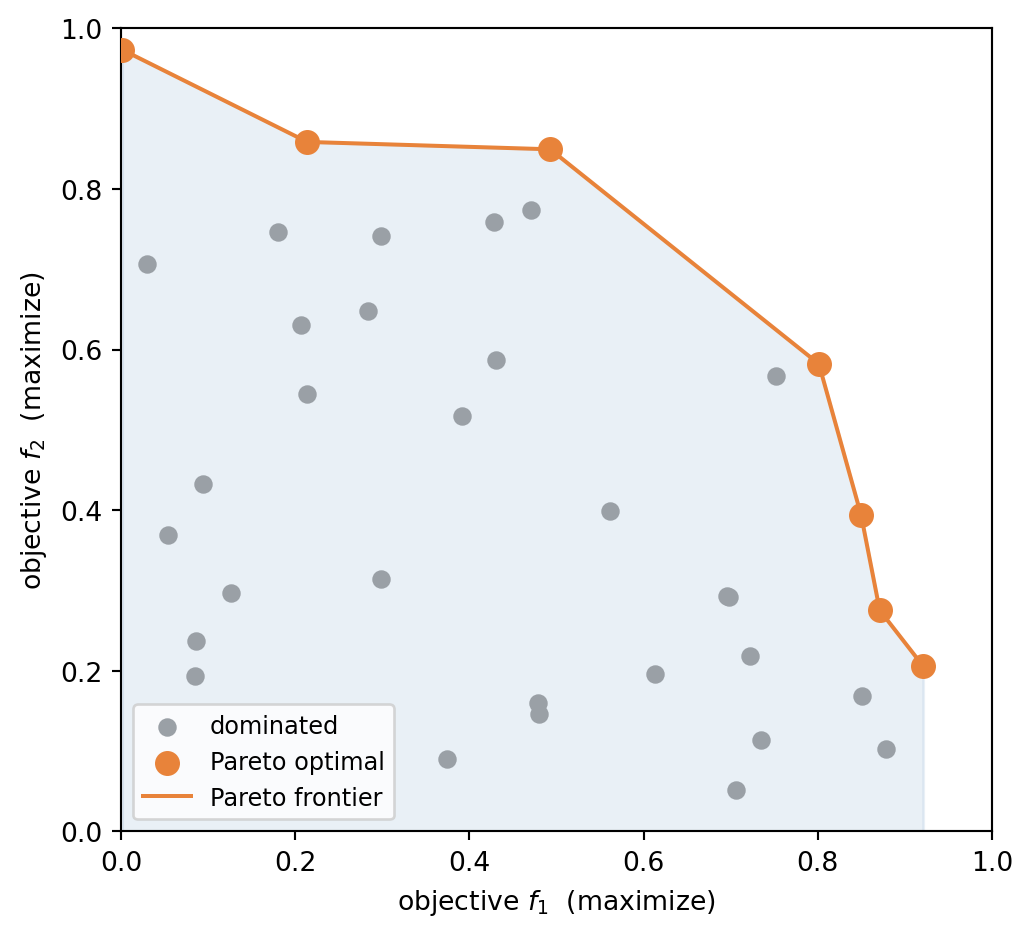
Real campaigns rarely optimize a single target: yield must be traded against cost, activity against selectivity. When objectives conflict, no single point is best at everything. A point is **dominated** if another point beats it on every objective; the set of **non-dominated** points is the **Pareto frontier** — the collection of optimal compromises. Depending on the chosen preference, the best achievable solution lies somewhere along this frontier.
```{python}
#| label: pareto-frontier
#| fig-cap: "Candidate solutions in objective space. Grey points are dominated, i.e. some other point beats them on both objectives. The orange Pareto-optimal points are non-dominated."
import numpy as np
import matplotlib.pyplot as plt

rng = np.random.default_rng(3)
# candidate solutions scattered in objective space; a concave trade-off front
pts = rng.uniform(0, 1, (45, 2))
pts = pts[(pts[:, 0] + pts[:, 1]) < 1.45]          # bias points below a front

def pareto_mask(P):                                 # maximize both objectives
    keep = np.ones(len(P), dtype=bool)
    for i, p in enumerate(P):
        if np.any(np.all(P >= p, axis=1) & np.any(P > p, axis=1)):
            keep[i] = False                         # someone dominates p
    return keep

mask = pareto_mask(pts)
front = pts[mask][np.argsort(pts[mask][:, 0])]      # sort frontier by f1

fig, ax = plt.subplots(figsize=(5.5, 5))
ax.fill_between(front[:, 0], 0, front[:, 1], color="#2b6cb0", alpha=0.10)
ax.scatter(pts[~mask, 0], pts[~mask, 1], c="#9aa0a6", s=35, label="dominated")
ax.scatter(front[:, 0], front[:, 1], c="#e8833a", s=70, zorder=5, label="Pareto optimal")
ax.plot(front[:, 0], front[:, 1], color="#e8833a", lw=1.5, zorder=4, label="Pareto frontier")
ax.set_xlabel("objective $f_1$  (maximize)")
ax.set_ylabel("objective $f_2$  (maximize)")
ax.set_xlim(0, 1); ax.set_ylim(0, 1)
ax.legend(loc="lower left", fontsize=9)
fig.tight_layout()
plt.show()
```
Two broad strategies handle the trade-off:
- **A posteriori**: map out the whole Pareto frontier, then choose. Thorough but expensive.
- **A priori**: commit to a preference up front and collapse the objectives into one. The most common is **scalarization** by a weighted sum,
$$
g(x, \mathbf{w}) = \sum_i w_i\,f_i(x) ,
$$
where the weights $w_i$ encode the relative importance of each objective $f_i$. The single scalar $g$ is then optimized with any of the methods above.
## Summary
Experimental objectives are expensive, gradient-free, noisy black boxes. The chapter covered three strategies and the multi-objective case:
- **Design of Experiments** commits a batch of runs to a deliberate grid and fits a polynomial with main effects, interactions, and curvature. One-factor-at-a-time is the naive alternative and is blind to exactly the interaction terms that matter.
- **Gaussian process regression** predicts a distribution rather than a number, separating **epistemic** uncertainty, which shrinks as data is added, from **aleatoric** noise, which does not.
- **Bayesian optimization** closes the loop: fit a GPR, maximize an **acquisition function** to choose the next experiment, measure, repeat. UCB turns the exploration--exploitation trade-off into a single score.
- **Multi-objective problems** have no single best point. The **Pareto frontier** collects the non-dominated compromises.