---
title: "Unsupervised Learning"
format:
html:
code-fold: true
toc: true
theme: cosmo
jupyter: python3
filters:
- shinylive
---
Most of this course is about *supervised* learning: there is a feature matrix $\mathbf{X}$, a target vector $\mathbf{y}$, and a fitted model $\hat{f}$ that maps $\mathbf{X}$ to predictions $\hat{\mathbf{y}}$. *Unsupervised* learning has no targets. It works only on $\mathbf{X}$ and identifies structure in the feature space.
This chapter focuses on two types of unsupervised learning:
- **dimensionality reduction**: compress many features into few
- **clustering**: group similar points without labels
Both *organize* high-dimensional (chemical) data before, or instead of, building a predictor.
## Dimensionality reduction
Why reduce dimensions? Three reasons:
- **Visualize** high-dimensional datasets in 2D or 3D, often revealing patterns or trends.
- **Regularize** models that lack their own regularization.
- **Speed up** training by giving the model fewer but more informative features.
Dimensionality-reduction methods fall into three families:
- **Projection** = flatten the data onto a lower-dimensional hyperplane (PCA).
- **Manifold learning** = fold the data onto a curved lower-dimensional surface (t-SNE, UMAP).
- **Deep learning** = learn the compression with a neural network (autoencoders).
A **linear projection** maps points onto a flat lower-dimensional hyperplane.
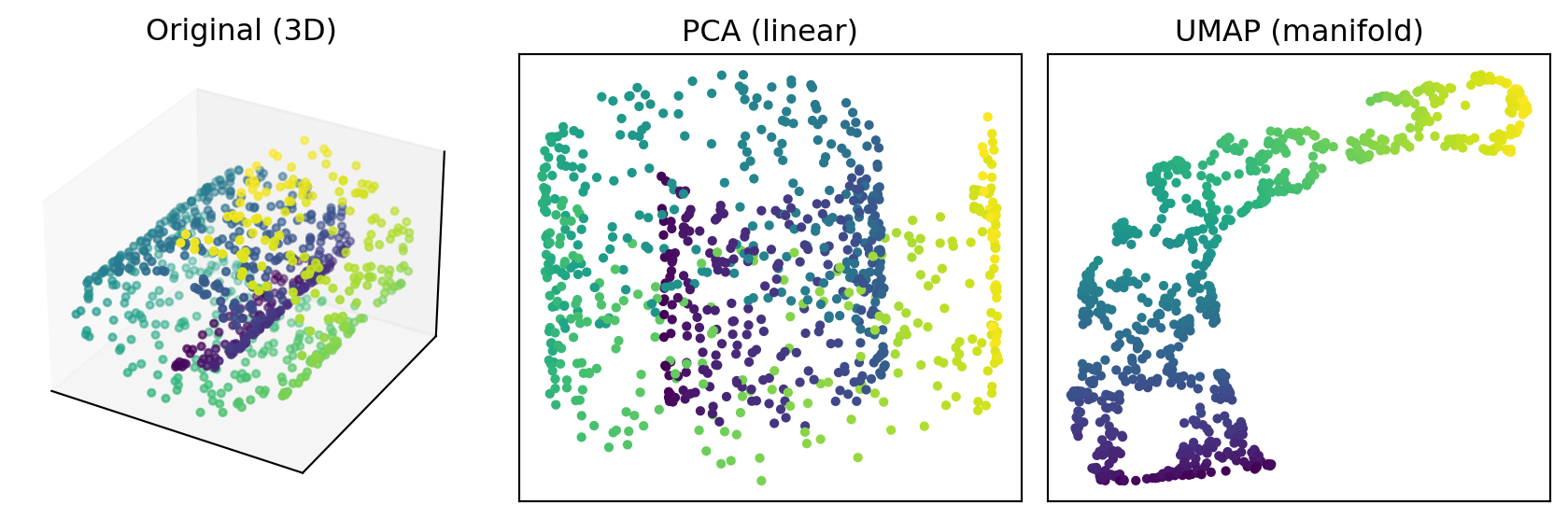
**Manifold learning** instead assumes the data lies on a curved lower-dimensional shape embedded in the high-dimensional space and tries to *unroll* it. When the data really is curved, unrolling preserves structure that a flat projection would overlap and destroy.
The figure below makes this concrete on the classic Swiss roll: a 2D sheet rolled up through 3D space. PCA (linear) flattens it and folds distant parts of the sheet onto each other; UMAP (manifold) unrolls it so the color gradient — position along the sheet — stays ordered.
```{python}
#| label: linear-vs-manifold
#| fig-cap: "A rolled-up 2D manifold in 3D. Linear projection (PCA) folds it; manifold learning (UMAP) unrolls it."
import numpy as np
import matplotlib.pyplot as plt
from sklearn.datasets import make_swiss_roll
from sklearn.decomposition import PCA
import umap

X, color = make_swiss_roll(n_samples=800, noise=0.05, random_state=0)

pca = PCA(n_components=2).fit_transform(X)
embedding = umap.UMAP(n_neighbors=30, min_dist=0.2, random_state=0).fit_transform(X)

fig = plt.figure(figsize=(9, 3))
ax = fig.add_subplot(1, 3, 1, projection="3d")
ax.scatter(X[:, 0], X[:, 1], X[:, 2], c=color, cmap="viridis", s=8)
ax.set_title("Original (3D)")
ax.set_xticks([]); ax.set_yticks([]); ax.set_zticks([])

for i, (proj, name) in enumerate([(pca, "PCA (linear)"), (embedding, "UMAP (manifold)")], start=2):
    ax = fig.add_subplot(1, 3, i)
    ax.scatter(proj[:, 0], proj[:, 1], c=color, cmap="viridis", s=8)
    ax.set_title(name)
    ax.set_xticks([]); ax.set_yticks([])

fig.tight_layout()
plt.show()
```
### Principal components analysis (PCA)
PCA is the most common dimensionality-reduction method: a *linear* transformation of the features onto a new set of orthogonal axes: the **principal components (PCs)**. The PCs are ordered such that the first PC captures the most variance, the second the most of what remains, and so on.
Formally, the PCs are the eigenvectors of the sample covariance matrix $\frac{1}{n-1}\mathbf{X}^\top\mathbf{X}$, and projecting onto the first $d$ of them, $\mathbf{X}'_d = \mathbf{X}\mathbf{W}_d$, gives the reduced data. Each component's eigenvalue, divided by their sum, is its **explained-variance ratio**.
While the leading PCs are highly informative about the data, for most datasets the remaining dimensions contain almost no information (or only noise).
By restricting the number of PCs and projecting the data into the lower-dimensional subspace, most of the information is retained while reducing dimensionality.
The number of PCs to use depends on the context:
- For **visualization**, only 2 or 3 are sensible.
- Use a **cutoff** on cumulative explained variance
- Stop where adding components gives diminishing returns (**Elbow plot**)
Training on only the most informative PCs reduces model complexity and therefore acts as regularization. Principal component regression (PCR) uses ordinary least squares on the first $k$ components. The caveat is that PCA orders components by variance in $\mathbf{X}$ alone, never consulting $\mathbf{y}$, so a discarded low-variance direction may be precisely the one that predicts the target.
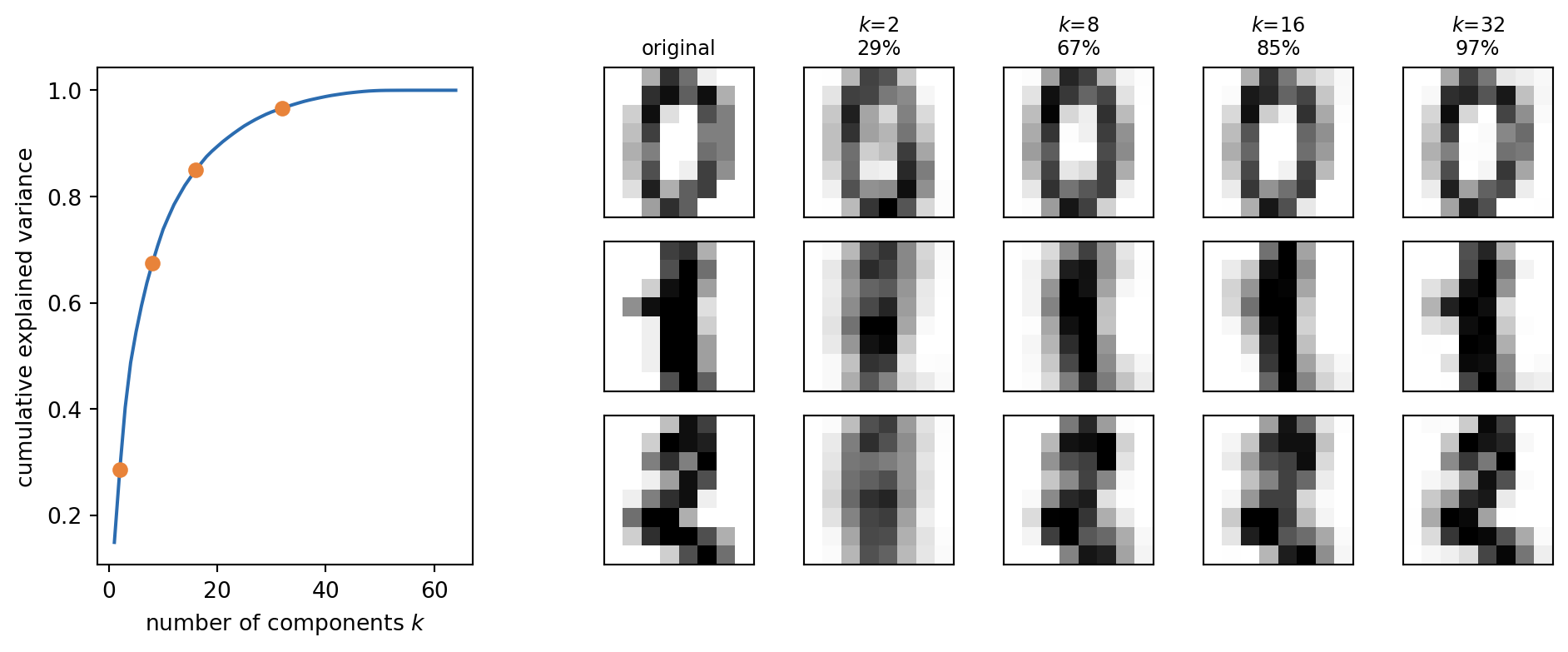
Below, PCA is fitted to the 64-pixel handwritten-digits dataset [@Alpaydin_1998]. The left panel is the cumulative-explained-variance curve, with the four values of $k$ used on the right marked on it. The right panels show three example digits as recorded, and then projected onto the first $k$ principal components and reconstructed. A handful of components already recover recognizable digits — the rest mostly add fine detail. (This reconstruction previews the autoencoder idea in the next section.)
```{python}
#| label: digits-pca
#| fig-cap: "PCA of the handwritten-digits dataset. Keeping the first $k$ of 64 principal components captures most of the variance; reconstructions from a handful of components are already recognizable."
import numpy as np
import matplotlib.pyplot as plt
from sklearn.datasets import load_digits
from sklearn.decomposition import PCA

digits = load_digits()
pca = PCA().fit(digits.data)
cum = np.cumsum(pca.explained_variance_ratio_)

ks = [2, 8, 16, 32]
examples = digits.data[:3]                  # three example digits, one per row
scores = pca.transform(examples)            # coordinates in the full PC basis

def reconstruct(k):                         # keep the first k PCs, drop the rest
    return pca.mean_ + scores[:, :k] @ pca.components_[:k]

fig = plt.figure(figsize=(10, 4.2))
gs = fig.add_gridspec(3, 8, width_ratios=[1, 1, 0.4, 1, 1, 1, 1, 1])

axc = fig.add_subplot(gs[:, 0:2])
axc.plot(range(1, len(cum) + 1), cum, color="#2b6cb0")
axc.scatter(ks, cum[np.array(ks) - 1], color="#e8833a", zorder=5)
axc.set_xlabel("number of components $k$")
axc.set_ylabel("cumulative explained variance")

columns = [(examples, "original")] + [(reconstruct(k), f"$k$={k}\n{cum[k-1]:.0%}") for k in ks]
for col, (imgs, title) in enumerate(columns):
    for row in range(3):
        ax = fig.add_subplot(gs[row, col + 3])
        ax.imshow(imgs[row].reshape(8, 8), cmap="gray_r", vmin=0, vmax=16)
        ax.set_xticks([]); ax.set_yticks([])
        if row == 0:
            ax.set_title(title, fontsize=9)

fig.tight_layout()
plt.show()
```
### Autoencoders
PCA is a *fixed* linear mapping to and from a smaller space. An **autoencoder** learns the mapping instead: an encoder neural network compresses the input `x` into a small latent vector `z = f(x)`, and a decoder reconstructs `x̂ = g(z)`. It is trained by minimizing the **reconstruction loss** between `x` and `x̂`. With non-linear activations and multiple layers (a *deep* or *stacked* autoencoder, often symmetric), it captures non-linear structure that PCA cannot.
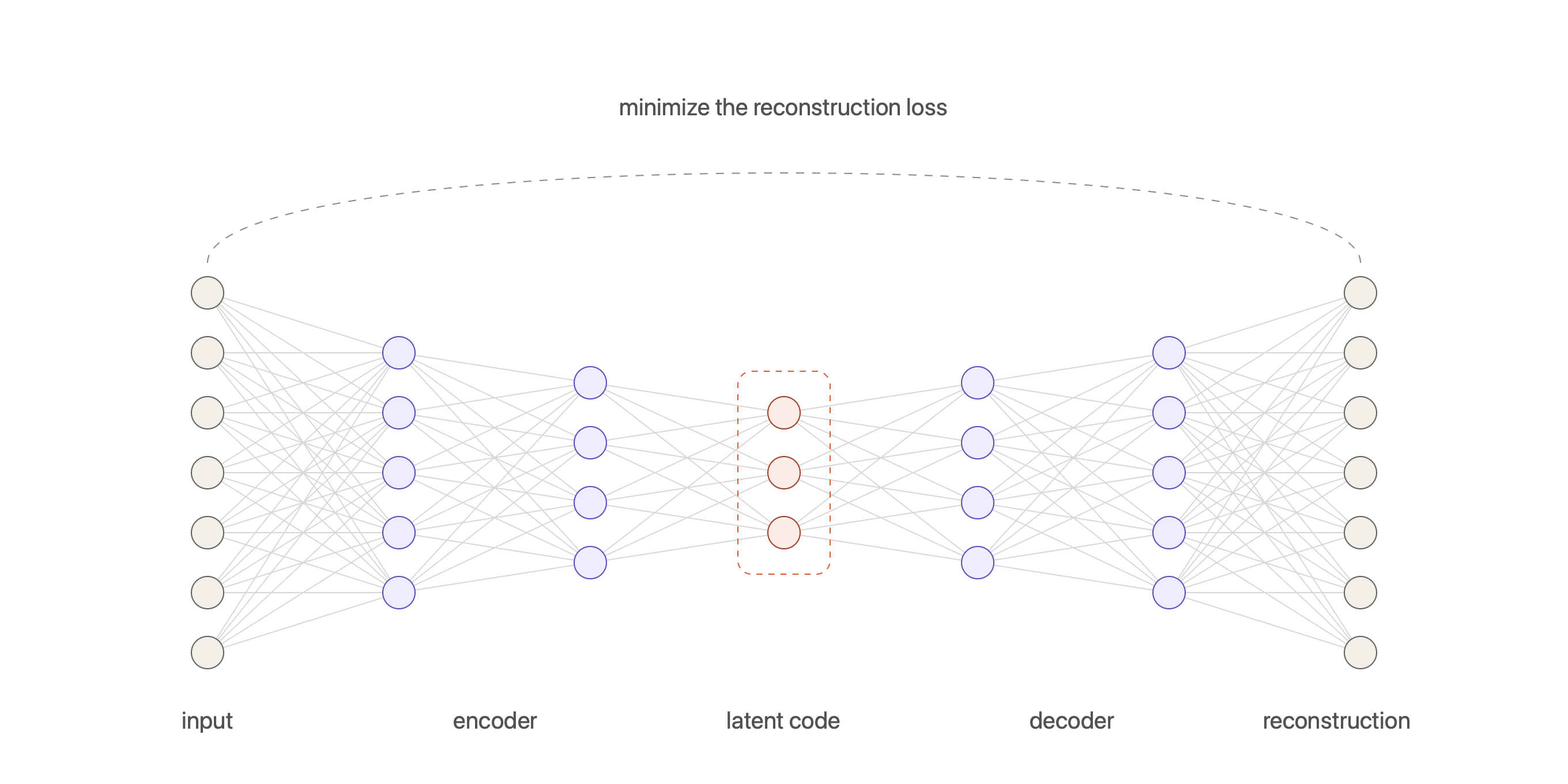
In chemistry, autoencoders compress a molecule into a fixed-size vector. A transformer encoder–decoder trained to reproduce SMILES yields a learned fingerprint from its bottleneck [@Honda_2019].
### UMAP
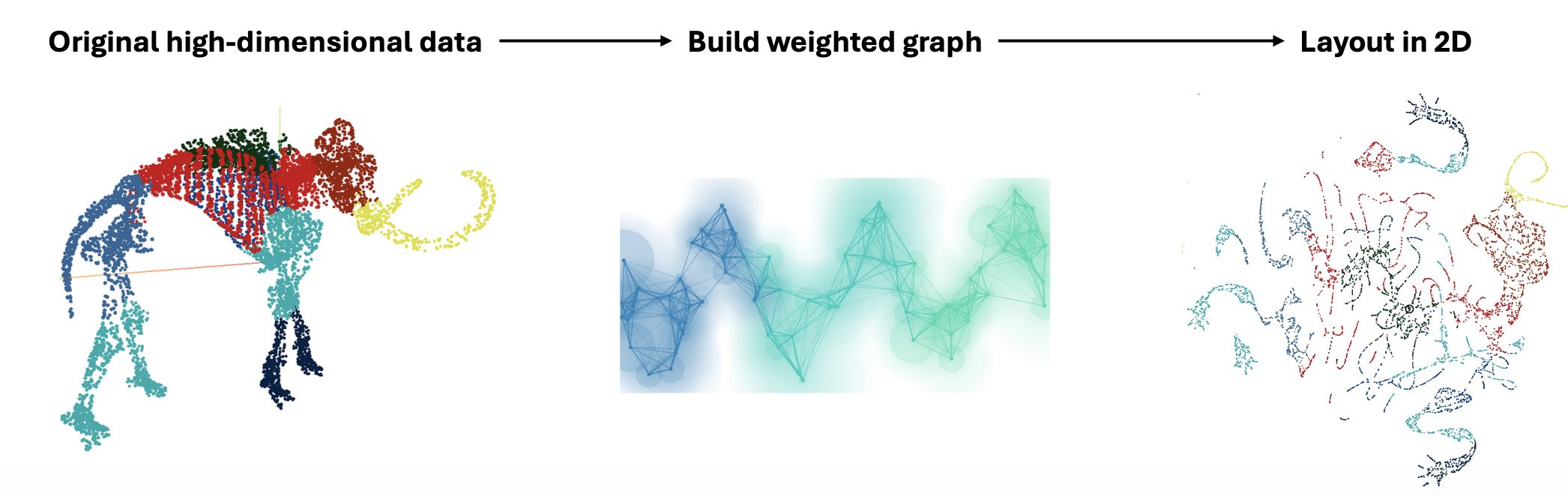
**Uniform Manifold Approximation and Projection** [@Healy_2024] has become the de facto tool for hard cases. It works in two steps:
1. **Build a connectivity graph in high dimensions.** Each point gets a "fuzzy radius" set by the distance to its $n$ nearest neighbors (the `n_neighbors` hyperparameter); where radii overlap, points are joined by a weighted edge — stronger for closer points. The distance metric is a free choice (Euclidean, or Tanimoto for fingerprints). More neighbors → larger radii → more large-scale structure captured.
2. **Lay the graph out in 2D.** A force-directed algorithm pulls connected points together and pushes distant ones apart, starting from an initial embedding and optimizing until the low-dimensional graph matches the high-dimensional one. The `min_dist` hyperparameter controls how tightly points can pack. The graph is then removed, leaving only the points.
The result preserves both local and global structure, as demonstrated by the projection of a 3D "mammoth" point cloud into a structured and recognizable 2D layout.
While there are a lot of different manifold learning algorithms, UMAP and **t-SNE** [@vanderMaaten_2008] are most commonly used in chemistry. The approaches differ in how they define and preserve closeness of datapoints but all share the goal of unrolling a curved manifold into a flat plot.
When using manifold learning, one has to be cautious about several aspects:
- **Hyperparameters** can drastically change the projection
- **Meaningless distances** — cluster sizes and the gaps between clusters are not quantitative
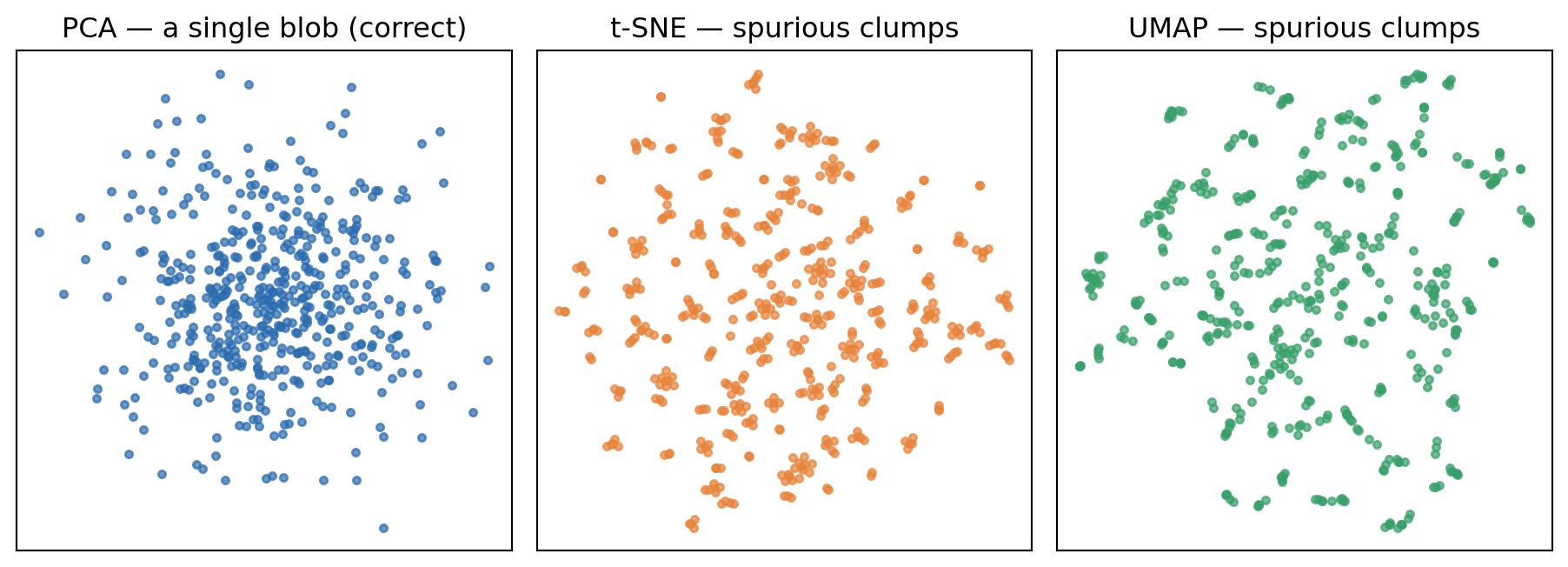
- **Random noise can look like structure** — pure noise can produce convincing-looking clusters
The last pitfall is the most dangerous when analyzing noisy, experimental data.
The example below considers a dataset of **50-dimensional Gaussian noise**. A 2D PCA projection correctly shows a single smooth blob. t-SNE and UMAP knot the same noise into dozens of little clumps that look like real groups but are pure artifacts.
```{python}
#| label: manifold-noise
#| fig-cap: "Pure 50-D Gaussian noise (no real structure) projected to 2D. PCA shows the honest blob; t-SNE and UMAP (small-neighborhood settings) knot it into spurious clumps that are artifacts of the algorithm, not structure in the data."
import warnings; warnings.filterwarnings("ignore")
import numpy as np
import matplotlib.pyplot as plt
from sklearn.decomposition import PCA
from sklearn.manifold import TSNE
import umap

rng = np.random.default_rng(0)
X = rng.normal(size=(500, 50))            # structureless isotropic noise

pca = PCA(n_components=2).fit_transform(X)
tsne = TSNE(n_components=2, perplexity=2, init="pca", random_state=0).fit_transform(X)
umap_emb = umap.UMAP(n_neighbors=3, min_dist=0.0, random_state=0).fit_transform(X)

fig, (ax1, ax2, ax3) = plt.subplots(1, 3, figsize=(9.5, 3.5))
ax1.scatter(pca[:, 0], pca[:, 1], s=10, color="#2b6cb0", alpha=0.7)
ax1.set_title("PCA — a single blob (correct)")
ax2.scatter(tsne[:, 0], tsne[:, 1], s=10, color="#e8833a", alpha=0.7)
ax2.set_title("t-SNE — spurious clumps")
ax3.scatter(umap_emb[:, 0], umap_emb[:, 1], s=10, color="#38a169", alpha=0.7)
ax3.set_title("UMAP — spurious clumps")
for ax in (ax1, ax2, ax3):
    ax.set_xticks([]); ax.set_yticks([])
fig.tight_layout()
plt.show()
```
Therefore it is recommended to stick with simpler, linear projections if possible and only reach for UMAP/t-SNE for complicated, non-linear data.
## Clustering
Clustering assigns each data point to a group **without access to labels**, using only the structure of the feature space — typically distances between points and regions of high point density.
Common applications of clustering include:
- **Anomaly / outlier detection** — e.g. flagging abnormal points in a chemical process.
- **Selecting representative compounds** — pick one molecule per cluster to cover a large chemical space efficiently (e.g. choosing aryl bromides for a reaction-scope study).
- **Semi-supervised learning** — propagate scarce labels within clusters.
There is a large zoo of clustering algorithms. Here, only k-means clustering is covered as an intuitive example. The drug-discovery community also uses Jarvis–Patrick and Butina clustering on fingerprints.
### k-means
The number of clusters $k$ is **specified in advance**; the algorithm then finds $k$ centroids and assigns each point to the nearest one, minimizing the within-cluster **sum of squared errors** (inertia),
$$
\text{SSE} = \sum_{i=1}^{n}\sum_{j=1}^{k} w^{(i,j)}\,\lVert \mathbf{x}^{(i)} - \boldsymbol{\mu}^{(j)} \rVert_2^2 ,
$$
where $w^{(i,j)} = 1$ if point $i$ belongs to cluster $j$ and 0 otherwise. Fitting iterates:
1. pick centroids (initially random)
2. assign each point to its closest centroid
3. move each centroid to the mean of its members
4. repeat until converged
It is **not guaranteed** to reach the global optimum, so in practice smart initialization (k-means++) and several random restarts are used.
### Choosing the number of clusters
Adding clusters *always* lowers the SSE, so it cannot simply be minimized. Instead:
- **Elbow plot**: plot SSE vs. $k$ and pick the "elbow" where the gains flatten.
- **Visual judgement**: sometimes the right number is obvious.
The widget below clusters synthetic 2D data with a from-scratch k-means implementation. The **iteration** slider replays the algorithm step by step for the chosen $k$: the centroids start at random points and the black trails show how they march to the cluster centers as the assignment is repeatedly updated, with the SSE falling at each step. The **$k$** slider sets the number of clusters; the right panel shows the elbow plot with the current $k$ marked — watch the converged SSE drop steeply, then flatten past the natural number of clusters.
```{shinylive-python}
#| standalone: true
#| viewerHeight: 520
from shiny import App, render, ui, reactive
import numpy as np
import matplotlib.pyplot as plt
import matplotlib
matplotlib.rcParams.update({
"font.family": "serif",
"figure.facecolor": "#fafaf7",
"axes.facecolor": "#fafaf7",
"axes.grid": True,
"grid.alpha": 0.3,
})
def make_data():
rng = np.random.default_rng(1)
# an elongated (anisotropic) cluster — k-means dislikes these
a = rng.normal([0.0, 0.0], [0.18, 0.95], (200, 2))
a = a @ np.array([[0.95, -0.32], [0.32, 0.95]]) + np.array([-2.4, 1.8])
# a tight, dense cluster
b = rng.normal([1.6, 2.8], 0.16, (120, 2))
# two looser clusters of differing spread
c = rng.normal([0.4, -0.6], 0.45, (180, 2))
d = rng.normal([2.6, -0.2], 0.30, (140, 2))
return np.vstack([a, b, c, d])
def kmeans_history(X, k, seed=0, max_iters=12):
# record (centroids, labels, inertia) at each iteration so the slider can replay them
rng = np.random.default_rng(seed)
centroids = X[rng.choice(len(X), k, replace=False)].copy()
history = []
for _ in range(max_iters):
d = np.linalg.norm(X[:, None, :] - centroids[None, :, :], axis=2)
labels = d.argmin(1) # (1) assign to nearest centroid
inertia = float(((X - centroids[labels]) ** 2).sum())
history.append((centroids.copy(), labels.copy(), inertia))
new = np.array([X[labels == j].mean(0) if np.any(labels == j) else centroids[j]
for j in range(k)]) # (2) move centroids to cluster means
if np.allclose(new, centroids):
break
centroids = new
return history
def converged_inertia(X, k):
return min(kmeans_history(X, k, seed=s)[-1][2] for s in range(3)) # best-of-3 restarts
X = make_data()
app_ui = ui.page_fluid(
ui.input_slider("k", "Number of clusters (k)", min=1, max=8, value=4, step=1),
ui.input_slider("it", "Iteration", min=1, max=12, value=1, step=1),
ui.output_plot("plot"),
)
def server(input, output, session):
@reactive.effect
@reactive.event(input.k)
def _reset_iteration():
ui.update_slider("it", value=1) # restart the replay whenever k changes
@output
@render.plot
def plot():
k = input.k()
hist = kmeans_history(X, k)
it = min(input.it(), len(hist)) # clamp: may converge before max_iters
idx = it - 1
centroids, labels, inertia = hist[idx]
# elbow: converged inertia for each k
ks = range(1, 9)
inertias = [converged_inertia(X, kk) for kk in ks]
fig, (ax1, ax2) = plt.subplots(1, 2, figsize=(8, 4))
ax1.scatter(X[:, 0], X[:, 1], c=labels, cmap="tab10", s=10, alpha=0.7)
# trace how each centroid moved up to this iteration
trail = np.array([hist[i][0] for i in range(idx + 1)]) # (idx+1, k, 2)
for j in range(k):
ax1.plot(trail[:, j, 0], trail[:, j, 1], color="black", lw=0.8, alpha=0.5, zorder=4)
ax1.scatter(centroids[:, 0], centroids[:, 1], c="black", marker="X", s=120,
edgecolors="white", linewidths=1.5, zorder=5)
tag = " (converged)" if idx == len(hist) - 1 else ""
ax1.set_title(f"SSE = {inertia:.0f}")
ax1.set_xlabel("$x_1$"); ax1.set_ylabel("$x_2$")
ax2.plot(list(ks), inertias, "o-", color="#2b6cb0")
ax2.scatter([k], [inertias[k - 1]], c="#e8833a", s=120, zorder=5)
ax2.set_title("Elbow plot")
ax2.set_xlabel("k"); ax2.set_ylabel("SSE / inertia")
fig.tight_layout()
return fig
app = App(app_ui, server)
```
### Recommendations
When applying clustering algorithms, several aspects should be kept in mind:
- **Standardize** features before clustering — otherwise large-scale features dominate the distance.
- **Choose a good distance metric** — e.g. Tanimoto for fingerprints.
- **Reduce dimensions first** for high-dimensional data (cluster on PCA/UMAP coordinates).
- Density-based and agglomerative methods often give better clusters than k-means but are slower.
Manual inspection of the dataset (or a low-dimensional projection) and the clustering results can additionally help to verify the plausibility of the clusters.
## Summary
Unsupervised learning works on $\mathbf{X}$ alone and splits into two tasks:
- **Dimensionality reduction** compresses many features into few, for visualization and for faster training on more informative features. **Projection** flattens the data onto a hyperplane (PCA), **manifold learning** unrolls a curved surface (UMAP, t-SNE), and **autoencoders** learn the compression with a neural network.
- **PCA** maps onto orthogonal axes ordered by explained variance. The cutoff can be selected based on variance or an elbow plot.
- **Manifold methods need care.** Distances and cluster sizes are not quantitative, and pure noise can be knotted into convincing-looking clusters. Prefer a linear projection unless the data is genuinely non-linear.
- **Clustering** groups points without labels which can be used for anomaly detection, picking representative compounds, and propagating scarce labels. **k-means** minimizes the within-cluster SSE for a $k$ fixed in advance, reaching only a local optimum, so use k-means++ and several restarts. Choose $k$ from an elbow plot, never by minimizing SSE.