---
title: "Data: Extraction, Curation and Management"
format:
html:
code-fold: true
toc: true
theme: cosmo
jupyter: python3
filters:
- shinylive
---
This chapter focusses on the first step of building a ML model for chemistry: the data.
To make a model's predictions better, one can either get more or better data, change the representation, or change the model. While commonly the model and representation is changed first, the *data first* perspective suggests that the first options is frequently the most impactful one.
In the data-centric view we standardize the model and instead iterate on the data: acquiring, cleaning, auditing, and generating it.
In contrast, a model-centric view would treat the data as a fixed asset and iterate on the representation, architecture, loss, and optimizer.
The model-centric view favours the computer scientist; the data-centric view favours the domain expert — the chemist.
The processing of data splits into three parts which will be treated separately:
- **Collection and extraction** — get the data (simulate, collect, find, buy, or extract it).
- **Curation** — remove low-quality data and make it consistent.
- **Management** — record, share, and handle data through the pipeline.
## Data collection and extraction
### Curated databases
For many problems, someone has already done the hard work and assembled a database. A non-exhaustive selection of popular examples:
| Source | Type | Availability | Size |
|---|---|---|---|
| PubChem | Molecules (+ bioassay) | Open | 112 M |
| SciFinder/CAS | Molecules/reactions | Commercial | 150 M |
| Protein Data Bank | Biomolecules | Open | 200 K |
| Reaxys | Molecules/reactions | Commercial | 57 M |
| Materials Project | Materials | Open | 154 K + 173 K sim. |
| ChEMBL | Bioactive molecules | Open | 2.4 M |
| ZINC20 | Molecules | Open | 230 M |
| CSD | Crystal structures | Commercial | 1.25 M |
| COD | Crystal structures | Open | 511 K |
| USPTO | Reactions | Open | 1.7 M |
A commonly used collection of molecules is the open database [**PubChem**](https://pubchem.ncbi.nlm.nih.gov) at the National Institutes of Health (NIH) storing information like chemical identifiers (InChI, InChIKey, canonical SMILES) and experimental data such as spectra or assay data.
Databases often provide different access points to the data: [bulk and FTP download](https://pubchem.ncbi.nlm.nih.gov/docs/downloads) or query it [programmatically](https://pubchem.ncbi.nlm.nih.gov/docs/programmatic-access) — for example with [`PubChemPy`](https://github.com/mcs07/PubChemPy), where a single call retrieves compounds e.g. by a compound name or a substructure search.
Several scientific studies utilize the database such as the *kraken* phosphine-ligand library [@Gensch_2022] and CYP-inhibition datasets [@Chen_2023].
[**The Materials Project**](https://next-gen.materialsproject.org) holds simulated data on materials, MOFs, and molecules, accessible via web or API. It is the training ground for foundation models — DeepMind's GNoME was trained on its crystal-structure stability data and then contributed ~380,000 predicted-stable materials back [@Merchant_2023]. Its relaxation trajectories were also packaged into the **MPtrj** dataset [@Deng_2023], which is now the training set for atomistic foundation models such as MACE-MP-0 [@Batatia_2025].
**Commercial databases** (SciFinder-n/CAS, Reaxys, CSD, SpringerMaterials) are curated over decades, but access is mostly via web interfaces, API access needs licensing (ETH has CSD and Reaxys), and there are restrictions on sharing.
That licensing has a cost for reproducibility. An amide-coupling dataset curated from Reaxys went from ~195,800 reactions down to a final 41,239 [@Liu_2023] — reproducible only if *you too* have Reaxys.
A similar problem arises when a study uses proprietary data that cannot be released, which prevents anyone outside the licensing institution from reproducing or extending the work.
### Querying a database with SQL
Most chemical databases are **relational**: data lives in tables, each row is a record, each column an attribute, and tables are linked by shared identifiers. The other common family is **document** (NoSQL) stores like [MongoDB](https://www.mongodb.com); graph and vector databases also exist.
You query relational databases with the programming language **SQL**.
LLMs are very useful to write specific SQL queries which are comprehensive to understand, relying on these central keywords:
| Command | Function |
|---|---|
| `SELECT` | choose columns |
| `FROM` | select tables |
| `WHERE` | filter rows |
| `ORDER BY` | sort rows |
| `GROUP BY` | group rows |
| `JOIN` | combine tables on a key |
| `COUNT` | count rows |
| `LIMIT` | cap the number of rows |
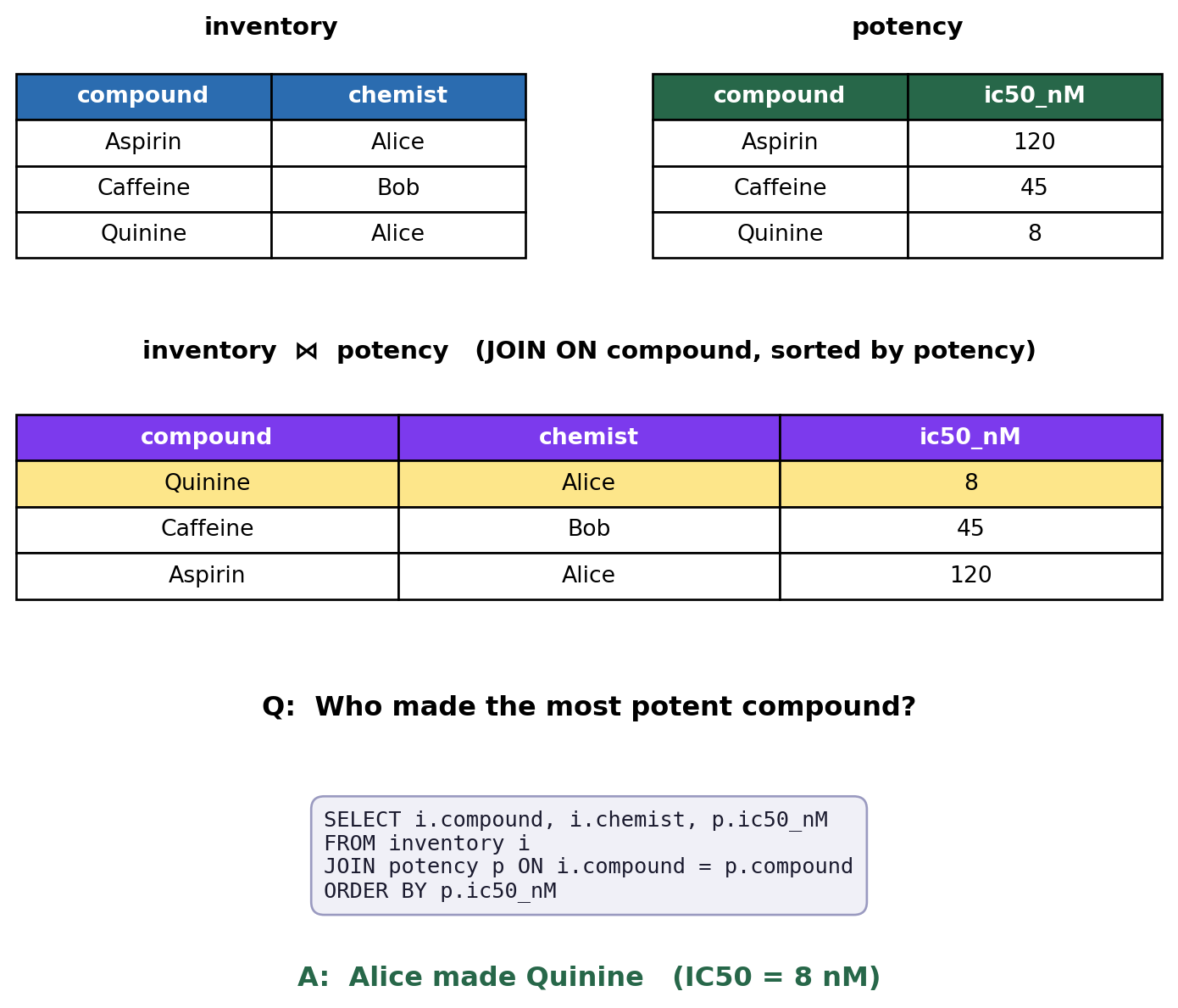
The power of a relational database is the **link**. Below we build two small tables in memory with Python's built-in `sqlite3` — one recording *who made each compound*, the other *how potent each compound is* — then `JOIN` them on the shared `compound` to answer a question neither table can alone: *who synthesized the most potent compound?* The figure shows both source tables, the joined result, and the answer.
```{python}
#| label: sql-join
#| fig-cap: "SQL example:"
import sqlite3
import pandas as pd
import matplotlib.pyplot as plt

con = sqlite3.connect(":memory:")
con.executescript("""
CREATE TABLE inventory (compound TEXT, chemist TEXT);
CREATE TABLE potency   (compound TEXT, ic50_nM INT);

INSERT INTO inventory VALUES ('Aspirin','Alice'),('Caffeine','Bob'),('Quinine','Alice');
INSERT INTO potency   VALUES ('Aspirin',120),('Caffeine',45),('Quinine',8);
""")

JOIN_SQL = (
    "SELECT i.compound, i.chemist, p.ic50_nM\n"
    "FROM inventory i\n"
    "JOIN potency p ON i.compound = p.compound\n"
    "ORDER BY p.ic50_nM"
)

inventory = pd.read_sql_query("SELECT * FROM inventory", con)
potency   = pd.read_sql_query("SELECT * FROM potency", con)
joined    = pd.read_sql_query(JOIN_SQL, con)   # same query that is displayed below
con.close()

best = joined.iloc[0]   # most potent = lowest IC50, first row after sorting

def draw(ax, df, title, color, highlight=None):
    ax.axis("off")
    ax.set_title(title, fontsize=11, fontweight="bold")
    t = ax.table(cellText=df.values, colLabels=df.columns, cellLoc="center", loc="center")
    t.auto_set_font_size(False); t.set_fontsize(10); t.scale(1, 1.7)
    for j in range(df.shape[1]):
        t[0, j].set_facecolor(color)
        t[0, j].set_text_props(color="white", fontweight="bold")
    if highlight is not None:
        for j in range(df.shape[1]):
            t[highlight + 1, j].set_facecolor("#fde68a")

fig = plt.figure(figsize=(8, 6.4))
gs = fig.add_gridspec(2, 2, height_ratios=[1, 1.15], hspace=0.35, wspace=0.25,
                      top=0.93, bottom=0.36, left=0.06, right=0.94)
draw(fig.add_subplot(gs[0, 0]), inventory, "inventory", "#2b6cb0")
draw(fig.add_subplot(gs[0, 1]), potency,   "potency",   "#276749")
draw(fig.add_subplot(gs[1, :]), joined, "inventory  ⋈  potency   (JOIN ON compound, sorted by potency)",
     "#7c3aed", highlight=0)

# question → query → answer, stacked below the tables
fig.text(0.5, 0.29, "Q:  Who made the most potent compound?",
         ha="center", fontsize=12, fontweight="bold")
fig.text(0.5, 0.155, JOIN_SQL, ha="center", va="center", ma="left",
         family="monospace", fontsize=9.5, color="#1a1a2e",
         bbox=dict(boxstyle="round,pad=0.6", facecolor="#f0f0f7", edgecolor="#9a9ac0"))
fig.text(0.5, 0.03,
         f"A:  {best.chemist} made {best.compound}   (IC50 = {best.ic50_nM} nM)",
         ha="center", fontsize=12, fontweight="bold", color="#276749")

plt.show()
```
### REST APIs
Not every service speaks SQL. Many expose a **REST API**: you interact over HTTP, the response is JSON conforming to a documented schema, and you can often just paste the URL into a browser. Each request uses an HTTP *method* that signals intent — the four common ones being:
| Method | Intent |
|---|---|
| `GET` | read/retrieve a record |
| `POST` | create a new record |
| `PUT` | update an existing record |
| `DELETE` | remove a record |
As a data consumer you almost always use `GET`. The *kraken* ligand database works this way — `requests.get("https://descriptor-libraries.molssi.org/api/kraken/molecules/data/10").json()` issues a `GET` for molecule `10` and returns a dictionary of descriptor statistics (min, max, Boltzmann average, …). Because a `GET` is just a URL, you can also paste it straight into a browser to see the same JSON.
### File formats in chemistry
Not all data lives in a database. Often it is just **flat files** — one file, or many nested in folders, sometimes with a `README` and checksums.
Chemistry has a zoo of file formats, and you will meet many of them:
| Format | Suffix | Use |
|---|---|---|
| MDL Molfile / SDF | `.mol` / `.sdf` | molecules |
| SMILES | `.smi` | molecules (not an official format) |
| MDL RXN / RDF | `.rxn` | reactions |
| CIF / mmCIF | `.cif` / `.mmcif` | crystal / biomolecule structures |
| PDB | `.pdb` | biomolecules |
| XYZ | `.xyz` | 3D coordinates (no connectivity) |
| Cube | `.cube` | grid data (e.g. orbitals) |
| FASTA | `.fasta` | DNA/protein sequences |
Some formats can be interconverted using programs such as [**OpenBabel**](https://openbabel.org): `obabel -i <in_fmt> <in_file> -o <out_fmt> <out_file>`.
### Extracting from primary sources
When no database has your data, you extract it from the literature. This can be **manual** or it can be **algorithmic**.
The USPTO patent reactions were curated with text tools — [OSCAR4](https://github.com/BlueObelisk/oscar4), [ChemicalTagger](https://github.com/BlueObelisk/chemicaltagger), and the [OPSIN](https://opsin.ch.cam.ac.uk) nomenclature parser (the basis of the commercial [Pistachio](https://www.nextmovesoftware.com/pistachio.html) set). Reactions drawn as *images* can be parsed by deep-learning tools like [ReactionDataExtractor](https://github.com/dmw51/reactiondataextractor), which segments arrows, labels, and structures — though segmentation is reasonable but it frequently fails to produce valid SMILES. The current frontier is **LLM agents** that read unstructured text, tables, and figures and emit structured data, picking the right tool per data type.
## Data curation
A raw data collection requires a nuanced curation procedure to ensure data quality, consistency and normalization.
Commonly, uncurated and partially curated datasets are often severely impacted by noise, missing data, errors and heterogenous standards.
### Quality issues
Machine-extracted reaction data is full of structural errors: a product duplicated among the reactants, a reactant misfiled as an agent, a solvent appearing among the products, or reactants missing entirely so that an atom (say fluorine) appears from nowhere because the reagent was never recorded.
A pedagogical example is a naive combination of different datasets of IC~50~ values [@Landrum_2024]: comparing reported values for identical targets across assays gives very poor correlation, and a strict curation procedure that only combines data with matching metadata improves the correlation while reducing the dataset size.
Exploratory Data Analysis is a straightforward technique to spot error. Plotting the variable distributions allows to identify outliers which can be analyzed to differentiate between an extreme case and a likely error. This step often requires domain expertise to judge the data quality.
### Standardization
Curation means applying a consistent set of standard operations to every molecule.
The goal is to establish a normalized representation which correctly distinguishes compounds that behave equivalently in the context of interest. Notably, in different contexts the standardization procedures frequently differ significantly.
Typical steps of a standardization protocol are:
- neutralizing charges (e.g. protonating charges basic atoms)
- reionizing the strongest acid
- normalizing functional-group representations
- picking a canonical tautomer
- disconnecting metals
- stripping counter-ion fragments
[RDKit](https://www.rdkit.org)'s [`MolStandardize`](https://www.rdkit.org/docs/source/rdkit.Chem.MolStandardize.rdMolStandardize.html) combines multiple of these steps and can be used for custom standardization procedures.
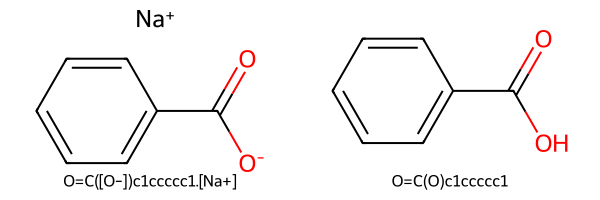
The example below strips the sodium counter-ion and neutralize sodium benzoate, recovering the parent acid:
```{python}
#| label: standardize
#| fig-cap: "Standardization: a salt is reduced to its neutral parent compound."
from rdkit import Chem
from rdkit.Chem import Draw
from rdkit.Chem.MolStandardize import rdMolStandardize

salt = Chem.MolFromSmiles("[Na+].[O-]C(=O)c1ccccc1")  # sodium benzoate
parent = rdMolStandardize.FragmentParent(salt)         # strip the salt fragment
parent = rdMolStandardize.Uncharger().uncharge(parent) # neutralize

Draw.MolsToGridImage(
    [salt, parent], molsPerRow=2, subImgSize=(300, 200),
    legends=[Chem.MolToSmiles(salt), Chem.MolToSmiles(parent)],
)
```
The [**ChEMBL curation pipeline**](https://github.com/chembl/ChEMBL_Structure_Pipeline) illustrates a specialized standardization procedure in the context of drug discovery applications [@Bento_2020]:
(1) check validity, (2) standardize, (3) reduce to a "parent" compound — so that tritiated, HCl, maleate, and methanesulfonate forms of paroxetine all map to one parent. Some standardizations are hard to formalize as rules; recent studies treat standardization as a *language-translation* problem, learning the PubChem/ChEMBL protocols at ~98% accuracy [@Cretu_2023] though the 2% failures, like a mangled organometallic, are a real problem.
### Duplicates and molecular equality
After standardizing you must remove duplicates. Two records containing the same molecule can be represented by different *string* representations.
Canonical SMILES differ between toolkits and they are not robust against several types of molecular transformations such as tautomers and protomers which are considered as duplicate for many applications.
Practical options are the [**InChIKey**](https://www.inchi-trust.org) and RDKit's [**MolHash**](https://greglandrum.github.io/rdkit-blog/posts/2021-05-07-rdkit-molhash-tutorial.html) for which the hash-based reprentations can deal with some of these problems. Greg Landrum's pragmatic advice (2016): if you just want something defensible and easy to explain, use InChIs or InChIKeys to recognize duplicates — "there would be times when that would be the wrong answer, but it would be a broadly accepted kind of wrong."
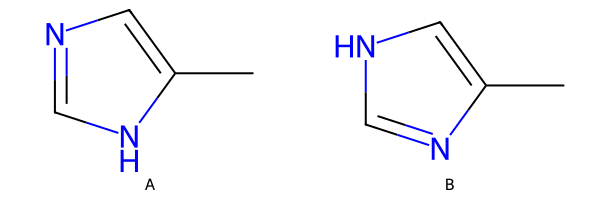
The example below shows two tautomers of methylimidazole with **different** canonical SMILES but the **same** InChIKey, so dedupliction would would only collapse them using the InChIKey representations.
```{python}
#| label: dedup
#| fig-cap: "Two tautomers: different canonical SMILES, same InChIKey connectivity layer."
from rdkit import Chem
from rdkit.Chem import Draw

taut_a = Chem.MolFromSmiles("Cc1cnc[nH]1")
taut_b = Chem.MolFromSmiles("Cc1c[nH]cn1")

smi_a, smi_b = Chem.MolToSmiles(taut_a), Chem.MolToSmiles(taut_b)
key_a, key_b = Chem.MolToInchiKey(taut_a), Chem.MolToInchiKey(taut_b)

# standard InChI has a mobile-H layer, so tautomers collapse onto one identical key
assert smi_a != smi_b, "canonical SMILES should differ"
assert key_a == key_b, "InChIKey should be identical for these tautomers"

from IPython.display import display

display(Draw.MolsToGridImage(
    [taut_a, taut_b], molsPerRow=2, subImgSize=(300, 200),
    legends=["A", "B"],
))

print(f"A  SMILES={smi_a:12s}  InChIKey={key_a}")
print(f"B  SMILES={smi_b:12s}  InChIKey={key_b}")
```
### Missing data
Real datasets have holes. Three strategies (see the [scikit-learn manual](https://scikit-learn.org/stable/modules/impute.html)):
- **Drop** the rows or columns that contain gaps — simple, but throws away signal.
- **Impute** the missing values by predicting them (mean, median, KNN, or iterative model-based imputation).
- **Use a model that tolerates missing values** — tree ensembles like Random Forest, [XGBoost](https://xgboost.readthedocs.io), [LightGBM](https://lightgbm.readthedocs.io), and histogram gradient boosting.
The choice is a trade-off between dataset size and noise. A row gets dropped the moment any one of its cells is missing. This can become a problem with high dimensional data if almost every row has at least one gap and would get dropped: If each cell is missing independently with probability $p$, the fraction of rows that survive is $(1-p)^d$, which collapses as the number of features $d$ grows.
Imputation instead keeps every row: each filled-in cell is noisy, but that row's other features are still real and informative.
Thereby, imputation keeps information despite introducing noise while its benefit grows with dimensionality.
The widget illustrates how model performance depends on how missing data is treated. The test scores of the regression models show the expected relation to the number of features. With few features, dropping is likely only affects a small number of data point, while imputation intorduces noise.With high dimensional data, dropping deletes increasingly more data such that here imputation is preferred. The imputation method matters too: **mean** and **median** fill each column in isolation, while **KNN** considers the most similar rows such that feature correlation is accounted for.
```{shinylive-python}
#| standalone: true
#| viewerHeight: 480
from shiny import App, render, ui
import numpy as np
import matplotlib.pyplot as plt
import matplotlib
matplotlib.rcParams.update({
"font.family": "serif",
"figure.facecolor": "#fafaf7",
"axes.facecolor": "#fafaf7",
"axes.grid": True,
"grid.alpha": 0.3,
})
N_TRAIN, N_TEST, NOISE = 150, 400, 1.0
N_LATENT = 4 # shared factors -> features are correlated (so KNN can help)
FEATURES = np.arange(2, 17)
SEEDS = range(5)
def datasets(d, seed):
rng = np.random.default_rng(seed)
beta = rng.normal(0, 1, d)
W = rng.normal(0, 1, (N_LATENT, d))
def gen(n):
Z = rng.normal(0, 1, (n, N_LATENT))
X = Z @ W + 0.4 * rng.normal(0, 1, (n, d)) # correlated features
X = (X - X.mean(0)) / X.std(0)
y = 2.0 + X @ beta + rng.normal(0, NOISE, n)
return X, y
return (*gen(N_TRAIN), *gen(N_TEST))
def knn_impute(X, M, k=7):
n, d = X.shape
col_mean = np.array([X[~M[:, j], j].mean() if (~M[:, j]).any() else 0.0 for j in range(d)])
Xb = X.copy()
for j in range(d):
Xb[M[:, j], j] = col_mean[j]
G = Xb @ Xb.T # fast pairwise distances via Gram matrix
sq = np.diag(G)
D2 = sq[:, None] + sq[None, :] - 2 * G
np.fill_diagonal(D2, np.inf)
out = X.copy()
for i in np.where(M.any(axis=1))[0]:
nn = np.argpartition(D2[i], k)[:k]
for j in np.where(M[i])[0]:
obs = ~M[nn, j]
out[i, j] = X[nn[obs], j].mean() if obs.any() else col_mean[j]
return out
def test_rmse(d, p, method, seed):
Xtr, ytr, Xte, yte = datasets(d, seed)
rng = np.random.default_rng(1000 + seed)
M = rng.random((N_TRAIN, d)) < p
keep = ~M.any(axis=1)
def fit_rmse(X, y):
A = np.column_stack([np.ones(len(X)), X])
coef, *_ = np.linalg.lstsq(A, y, rcond=None)
return float(np.sqrt(np.mean((coef[0] + Xte @ coef[1:] - yte) ** 2)))
drop = fit_rmse(Xtr[keep], ytr[keep]) if keep.sum() > d + 2 else np.nan
if method == "knn":
Xi = knn_impute(Xtr, M)
else:
Xi = Xtr.copy()
for j in range(d):
obs = Xi[~M[:, j], j]
Xi[M[:, j], j] = obs.mean() if method == "mean" else np.median(obs)
return drop, fit_rmse(Xi, ytr)
app_ui = ui.page_fluid(
ui.layout_sidebar(
ui.sidebar(
ui.input_slider("frac", "Missing fraction", min=0.0, max=0.4, value=0.15, step=0.05),
ui.input_radio_buttons("method", "Impute with",
{"mean": "Mean", "median": "Median", "knn": "k-nearest neighbours"}),
),
ui.output_plot("plot"),
),
)
LABELS = {"mean": "mean impute", "median": "median impute", "knn": "KNN impute"}
def server(input, output, session):
@output
@render.plot
def plot():
p, method = input.frac(), input.method()
drop, imp = [], []
for d in FEATURES:
res = np.array([test_rmse(d, p, method, s) for s in SEEDS])
dvals = res[:, 0]
drop.append(np.nanmean(dvals) if np.isfinite(dvals).sum() >= 3 else np.nan)
imp.append(res[:, 1].mean())
drop, imp = np.array(drop), np.array(imp)
fig, ax = plt.subplots(figsize=(7, 4.3))
ax.plot(FEATURES, imp, "s-", color="#276749", lw=2, label=f"{LABELS[method]}")
ax.plot(FEATURES, drop, "o-", color="#c53030", lw=2, label="drop (delete incomplete rows)")
fail = FEATURES[np.isnan(drop)]
if fail.size:
ax.axvspan(fail.min() - 0.5, FEATURES.max() + 0.5, color="#c53030", alpha=0.07)
ax.set_xlabel("number of features")
ax.set_ylabel(rf"test RMSE $\downarrow$")
ax.legend(loc="upper left", fontsize=10, framealpha=0.9)
return fig
app = App(app_ui, server)
```
## Data management
Curating data once is not enough: it has to be recorded, stored, and shared so that it stays usable.
In practice, many published datasets fall short of this, as proper data management takes substantial effort which signifiantly complicates the interaction with datasets.
### FAIR data
The guiding principle is **FAIR** (Wilkinson et al., *Sci. Data* 2016):
- **F**indable — metadata, search engines, DOIs.
- **A**ccessible — file download, APIs, databases.
- **I**nteroperable — machine-readable, combinable with other data.
- **R**eusable — metadata describing what the data is and how it was made, plus a reuse license (e.g. CC0, CC-BY).
FAIR data makes future reuse possible, ensures integrity, and is now required by most funding agencies and adopted by industry. The anti-pattern is data trapped in PDF "figures" (tables) or ChemDraw drawings — present, but not machine-readable.
### Capturing data: ELNs
Good management starts at capture. **Electronic Laboratory Notebooks** record experiments in electronic form, couple to instrument data and analysis, and make experiments findable and reusable later — for example, for ML. Examples include the open-source [**Chemotion**](https://chemotion.net) and the commercial [**Revvity Signals Notebook**](https://www.revvitysignals.com/products/research/signals-notebook). [**openBIS**](https://openbis.ch) (developed at ETH) goes further, combining FAIR data management, an ELN, and inventory, and linking out to Jupyter notebooks for analysis.
### Storing data: databases vs. flat files
Where should your data live — files in folders, or a database?
| Aspect | Flat files | Database |
|---|---|---|
| Data integrity | not enforced | enforced |
| Querying | custom scripts | SQL |
| Setup | easy | harder |
| Large binary files | easy | needs care |
| Rolling back | hard | easier |
| Simultaneous access | risky | safe |
| Scalability | poor | good |
Flat files are easy to start with; databases pay off as data grows and is shared.
### Sharing data: repositories
To publish data, deposit it in a repository. [**Zenodo**](https://zenodo.org) gives free storage (<50 GB), guarantees it for the CERN lifetime, versions each release with its own DOI, and integrates with GitHub. Subject-specific repositories add domain features: [**ioChem-BD**](https://www.iochem-bd.org) for simulated molecular/materials data, [**QCArchive**](https://qcarchive.molssi.org) and [**Materials Cloud**](https://www.materialscloud.org) likewise.
### Workflow tools
Finally, manage the data *through the pipeline* so the whole analysis is reproducible. Code-based tools like [**Snakemake**](https://snakemake.github.io) chain input structures → simulations → plotting → paper (with [Quarto](https://quarto.org)) into one command — the same approach used to produce this very script. Visual "no-code" tools like [**KNIME**](https://www.knime.com) wire data between nodes from input through processing to output for those who prefer not to write code.
## Summary
Data work has three stages.
- **Collection and extraction** gets the data from databases (PubChem, Materials Project, COD), APIs, flat files, or by manual/algorithmic/LLM extraction from the literature.
- **Curation** makes it trustworthy: inspect it, standardize it, remove duplicates by InChIKey or MolHash, and decide how to handle missing values.
- **Management** keeps it usable: make it FAIR, capture it in ELNs, store it sensibly, share it on Zenodo, and tie the pipeline together with workflow tools.
Remember the data-first perspective — this is where the real impact is.