3 Linear Models
The previous chapter showed how to turn a molecule into a numerical representation — a feature vector. Stacking these vectors row by row gives a feature matrix \(\mathbf{X}\), with one row \(\mathbf{x}^{(i)}\) per sample (of \(n\) samples) and one column per feature (of \(m\) features). This chapter takes the next step in the modelling pipeline: using such features to predict a property of interest, that is, learning a model that maps a representation \(\mathbf{X}\) to a target \(\mathbf{y}\).
3.1 Supervised Learning
When every training example comes with a known target, the task is supervised learning. We seek a parametrized model \(\hat{y}(\mathbf{x}) = \hat{f}(\mathbf{x}, \mathbf{w})\) whose parameters (weights) \(\mathbf{w}\) are determined by minimizing a loss function \(\mathcal{L}\) that quantifies the disagreement between predictions and targets on the training data. The fitted model can then be used to predict the property for new molecules, or to gain insight into which features matter.
Supervised problems are usually split into two categories, depending on the target:
- Regression — predict a continuous value (e.g. a reaction yield or a binding energy).
- Classification — predict a discrete label (e.g. whether a reaction succeeds or fails).
Typically, the representation has a larger impact on performance than the choice of model, which is important to keep in mind for any practical work. Second, supervised learning is only one of three learning paradigms: unsupervised learning, which finds structure in unlabelled data, is covered in a later chapter, while reinforcement learning is outside the scope of this course.
We begin with the simplest supervised models — linear models — which are fast, interpretable, and a strong baseline before turning to non-linear methods.
3.2 Ordinary Least Squares
Linear regression is the simplest supervised model: it expresses the target as a weighted linear combination of features plus an intercept \(b\):
\[ y = w_1 x_1 + w_2 x_2 + \cdots + w_m x_m + b = \sum_{j=1}^{m} w_j x_j + b = \mathbf{w}^\top \mathbf{x} \]
Here, the intercept is often folded into the weight vector by appending a 1 to the feature vector, giving the compact notation \(\mathbf{w}^\top \mathbf{x}\).
3.2.1 Fitting the coefficients
The standard approach minimizes the mean squared error (MSE) loss function:
\[ \mathcal{L}(\mathbf{w}) = \frac{1}{n} \sum_{i=1}^{n} \left( \hat{y}^{(i)} - y^{(i)} \right)^2 \]
This can be solved analytically via the Normal equation:
\[ \mathbf{w} = (\mathbf{X}^\top \mathbf{X})^{-1} \mathbf{X}^\top \mathbf{y} \]
In practice, directly computing the inverse is numerically unstable, so implementations use QR or singular value decomposition instead.
Alternatively, the coefficients can be found via gradient descent, which iteratively updates the weights using the gradient scaled by a learning rate \(\eta\):
\[ \mathbf{w}^{\text{next}} = \mathbf{w}^{\text{current}} - \eta \cdot \nabla_{\mathbf{w}} \mathcal{L}(\mathbf{w}) \]
It is used to train linear regression on very large datasets and we will come back to it in the context of neural networks. You will encounter additional metrics to assess model performance in the next chapter.
3.2.2 Interactive example: univariate linear regression
Use the sliders to change the slope and intercept manually and observe how the MSE changes. The orange line is your manual fit; the dashed line is the OLS solution.
#| '!! shinylive warning !!': |
#|   shinylive does not work in self-contained HTML documents.
#|   Please set `embed-resources: false` in your metadata.
#| standalone: true
#| viewerHeight: 520

from shiny import App, render, ui, reactive
import numpy as np
import matplotlib.pyplot as plt
import matplotlib

matplotlib.rcParams.update({
    "font.family": "serif",
    "figure.facecolor": "#fafaf7",
    "axes.facecolor": "#fafaf7",
    "axes.grid": True,
    "grid.alpha": 0.3,
})

BLUE = "#2b6cb0"
RED = "#c53030"
ORANGE = "#e8833a"
GREEN = "#276749"
PURPLE = "#805ad5"

# Generate data: y = 1.2x + 0.3 + noise
np.random.seed(42)
n = 30
true_w, true_b = 1.2, 0.3
x_data = np.linspace(-2, 2, n)
y_data = true_w * x_data + true_b + np.random.uniform(-0.8, 0.8, n)

# OLS solution
x_mean = x_data.mean()
y_mean = y_data.mean()
ols_w = np.sum((x_data - x_mean) * (y_data - y_mean)) / np.sum((x_data - x_mean) ** 2)
ols_b = y_mean - ols_w * x_mean
mse_ols = np.mean((y_data - (ols_w * x_data + ols_b)) ** 2)

app_ui = ui.page_fluid(
    ui.layout_columns(
        ui.input_slider("slope", "Slope (w)", min=-3, max=3, value=0.5, step=0.01),
        ui.input_slider("intercept", "Intercept (b)", min=-3, max=3, value=0.0, step=0.01),
    ),
    ui.output_plot("ols_plot"),
)

def server(input, output, session):
    @render.plot
    def ols_plot():
        w = input.slope()
        b = input.intercept()
        y_pred_user = w * x_data + b
        mse_user = np.mean((y_data - y_pred_user) ** 2)

        fig, ax = plt.subplots(figsize=(6, 4))
        ax.set_xlim(-2.5, 2.5)
        ax.set_ylim(-5, 5)

        # Residual lines
        for xi, yi in zip(x_data, y_data):
            yp = w * xi + b
            ax.plot([xi, xi], [yi, yp], color=ORANGE, linewidth=1, alpha=0.4)

        # Data points
        ax.scatter(x_data, y_data, color=BLUE, s=30, alpha=0.8, zorder=5)

        # User's line
        xs = np.array([-2.5, 2.5])
        ax.plot(xs, w * xs + b, color=ORANGE, linewidth=2.5, label=f"Your fit  MSE = {mse_user:.3f}")

        # OLS line (dashed)
        ax.plot(xs, ols_w * xs + ols_b, color=BLUE, linewidth=1.5, linestyle="--",
                label=f"OLS best  MSE = {mse_ols:.3f}")

        ax.set_xlabel("x")
        ax.set_ylabel("y")
        ax.legend(loc="upper left", fontsize=10, framealpha=0.9)
        fig.tight_layout()
        return fig

app = App(app_ui, server)
Try to get your orange line as close to the dashed OLS solution as possible. Notice how the MSE increases rapidly when you move away from the optimal weights. The loss surface has a unique minimum for linear regression provided \(\mathbf{X}^\top\mathbf{X}\) is invertible. With perfectly collinear features, or more features than samples, the minimum is an entire subspace of solutions rather than a single point.
3.3 Bias-Variance Tradeoff
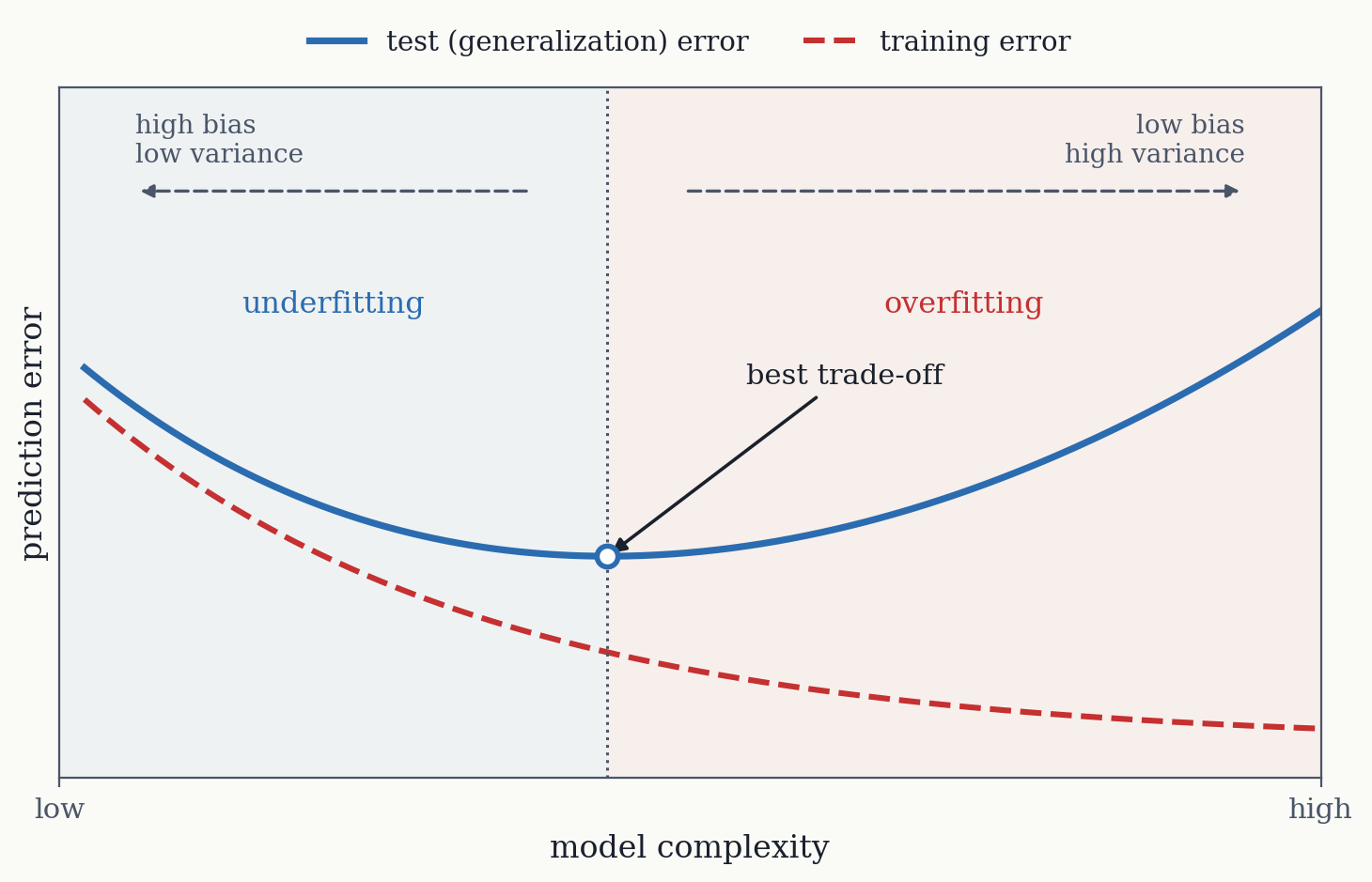
Adding more features to a linear regression model and making it more complex can improve its performance but only to an extent. Model complexity needs to be “just right.” Too much complexity leads to high variance (overfitting), while too little leads to high bias (underfitting). The expected error decomposes as:
\[ E(\mathbf{y} - \hat{\mathbf{y}})^2 = \text{Bias}(\hat{f}(\mathbf{x}))^2 + \text{Var}(\hat{f}(\mathbf{x})) + \text{Var}(\epsilon) \]
- Bias measures how far the average prediction is from the true value.
- Variance measures how much predictions fluctuate between models fitted to different training sets drawn from the same data-generating process. In other words: it is a property of that process, not of the one training set at hand.
- Irreducible error is noise that no model can remove.
3.3.1 Interactive example: polynomial degree and overfitting
A polynomial fit is still a linear model: it is linear in its coefficients, and only the features are non-linear. The app builds the columns \(1, x, x^2, \dots, x^d\) and solves exactly the normal equation from the previous section, so increasing the degree adds features rather than changing the method.
The data were generated from \(\sin(x)\) with added noise, so the true relationship is known and is drawn as the dashed grey line. Two sliders control the experiment: the degree \(d\), which sets model complexity, and the noise level, which sets the irreducible error \(\text{Var}(\epsilon)\) in the decomposition above. There are 25 data points, so by \(d = 15\) the model has nearly as many coefficients as there are observations to constrain them.
Only the blue training points enter the fit. The open green circles are a held-out test set of 15 points drawn from the same process, and the box reports the error on each set separately. Watch the two numbers come apart as the degree rises: the training error falls all the way down, while the test error falls, reaches a minimum, and then climbs back. That U-shape against a monotonically falling training error is the bias–variance trade-off made visible, and it is the reason training error alone cannot tell you when to stop adding complexity.
#| '!! shinylive warning !!': |
#|   shinylive does not work in self-contained HTML documents.
#|   Please set `embed-resources: false` in your metadata.
#| standalone: true
#| viewerHeight: 520

from shiny import App, render, ui, reactive
import numpy as np
import matplotlib.pyplot as plt
import matplotlib

matplotlib.rcParams.update({
    "font.family": "serif",
    "figure.facecolor": "#fafaf7",
    "axes.facecolor": "#fafaf7",
    "axes.grid": True,
    "grid.alpha": 0.3,
})

BLUE = "#2b6cb0"
RED = "#c53030"
ORANGE = "#e8833a"
GREEN = "#276749"
PURPLE = "#805ad5"

# Generate data. The unit noise draws are fixed here so that moving the noise
# slider rescales the same pattern rather than resampling it.
np.random.seed(123)
n = 25
x_data = np.linspace(-3, 3, n)
noise_train = np.random.uniform(-1, 1, n)

# Held-out test points from the same process, at x positions the model never
# fits. Only the training points enter the fit.
n_test = 15
x_test = np.sort(np.random.uniform(-3, 3, n_test))
noise_test = np.random.uniform(-1, 1, n_test)

app_ui = ui.page_fluid(
    ui.layout_columns(
        ui.input_slider("degree", "Polynomial degree", min=1, max=15, value=1, step=1),
        ui.input_slider("noise", "Noise level", min=0.2, max=3.0, value=1.0, step=0.1),
    ),
    ui.output_plot("poly_plot"),
)

def server(input, output, session):
    @render.plot
    def poly_plot():
        deg = input.degree()
        noise = input.noise()

        y_data = np.sin(x_data) + noise_train * noise
        y_test = np.sin(x_test) + noise_test * noise

        # Polynomial fit with small regularization for numerical stability.
        # Fitted on the training points only.
        X = np.vander(x_data, deg + 1, increasing=True)
        XtX = X.T @ X + 1e-10 * np.eye(deg + 1)
        w = np.linalg.solve(XtX, X.T @ y_data)

        mse_train = np.mean((y_data - X @ w) ** 2)
        X_test = np.vander(x_test, deg + 1, increasing=True)
        mse_test = np.mean((y_test - X_test @ w) ** 2)

        fig, ax = plt.subplots(figsize=(6, 4))
        ax.set_xlim(-3.5, 3.5)
        ax.set_ylim(-4, 4)

        # True function (sin) dashed
        xs = np.linspace(-3.5, 3.5, 200)
        ax.plot(xs, np.sin(xs), color="#999", linewidth=1.5, linestyle="--", label="True: sin(x)")

        # Polynomial curve
        xs_fit = np.linspace(-3.5, 3.5, 300)
        X_fit = np.vander(xs_fit, deg + 1, increasing=True)
        y_fit = np.clip(X_fit @ w, -5, 5)
        ax.plot(xs_fit, y_fit, color=RED, linewidth=2.5, label=f"Degree {deg} fit")

        # Training points (fitted) and held-out test points (not fitted)
        ax.scatter(x_data, y_data, color=BLUE, s=30, alpha=0.8, zorder=5,
                   label="Training points")
        ax.scatter(x_test, y_test, facecolors="none", edgecolors=GREEN, s=45,
                   linewidths=1.6, zorder=6, label="Test points")

        # The test error can grow by orders of magnitude at high degree, so fall
        # back to scientific notation rather than printing an unreadable number.
        def fmt(v):
            return f"{v:.3f}" if v < 1000 else f"{v:.1e}"

        ax.text(0.02, 0.97, f"train MSE = {fmt(mse_train)}\ntest MSE  = {fmt(mse_test)}",
                transform=ax.transAxes, va="top", fontsize=10, family="monospace",
                bbox=dict(boxstyle="round,pad=0.4", facecolor="white", edgecolor="#ddd"))

        ax.legend(loc="upper right", fontsize=8, framealpha=0.9)
        ax.set_xlabel("x")
        ax.set_ylabel("y")
        fig.tight_layout()
        return fig

app = App(app_ui, server)
At degree 1, the model is too simple to capture the curve (underfitting). With moderately higher degrees, it can capture the shape well: at the default noise level the test error bottoms out around degree 3. Beyond that, it starts chasing individual noise points (overfitting), and the test error climbs back up while the training error keeps falling. By degree 15 the training error has dropped to roughly a fifth of the test error, and the curve runs off the top of the panel just past the outermost points. Increase the noise level to see how overfitting becomes more dramatic.
3.4 Regularization
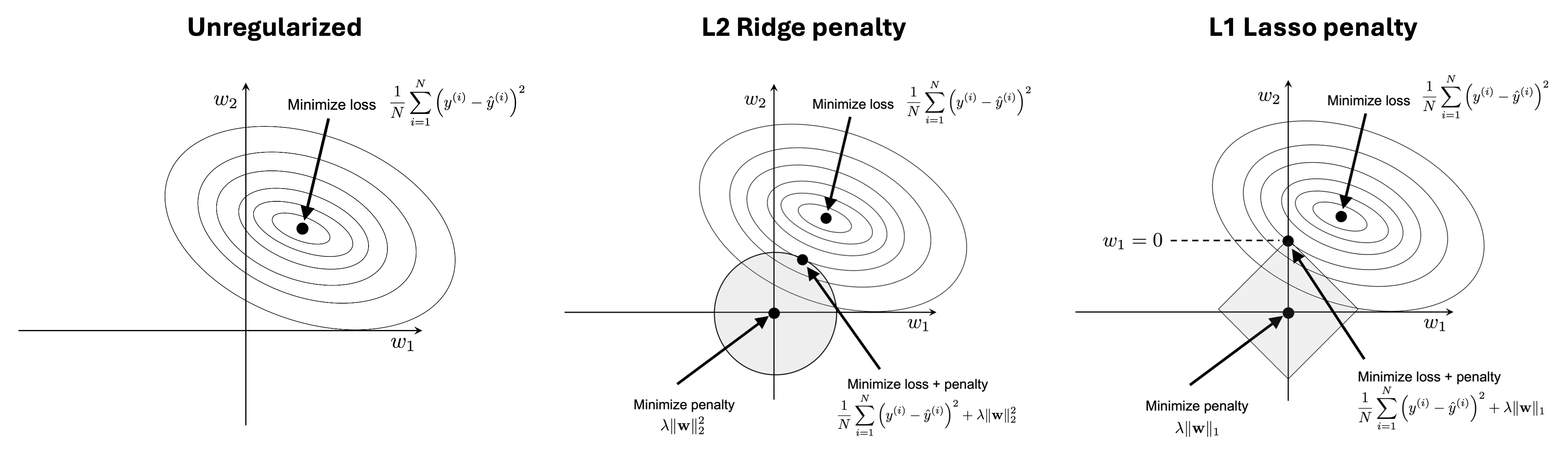
We can employ different strategies to reduce overfitting, like collecting more data or manually choosing simpler models with fewer parameters, but often the method of choice is regularization which are methods that effectively reduce the number of parameters. There are various techniques that either work explicitly via penalizing larger weights or implicitly by e.g. limiting a model’s training time. Some of them also reduce the number of features the model actually uses, not just the size of the weights: Lasso sets weights to exactly zero, which is equivalent to dropping those columns of \(\mathbf{X}\). This connects regularization to feature selection and feature extraction.
3.4.1 Ridge Regression
Ridge regression adds an L2 penalty to the loss, shrinking all coefficients toward zero:
\[ \mathcal{L}(\mathbf{w}) = \frac{1}{n} \sum_{i=1}^{n} (y^{(i)} - \hat{y}^{(i)})^2 + \lambda \|\mathbf{w}\|_2^2 \]
with the squared L2 norm \(\|\mathbf{w}\|_2^2 = \sum_{j=1}^{m} w_j^2\).
The hyperparameter \(\lambda\) controls regularization strength. Larger \(\lambda\) means stronger shrinkage, lower variance, but higher bias. Hyperparameters are not fit directly to the data but are selected independently. Ridge has a closed-form solution:
\[ \mathbf{w} = (\mathbf{X}^\top \mathbf{X} + \lambda \mathbf{I})^{-1} \mathbf{X}^\top \mathbf{y} \]
Feature standardization is required so the penalty treats all features equally.
3.4.2 Lasso Regression
Lasso uses L1 regularization, which produces sparse solutions (many weights become exactly zero):
\[ \mathcal{L}(\mathbf{w}) = \frac{1}{n} \sum_{i=1}^{n} (y^{(i)} - \hat{y}^{(i)})^2 + \lambda \|\mathbf{w}\|_1 \]
with the L1 norm \(\|\mathbf{w}\|_1 = \sum_{j=1}^{m} |w_j|\).
This performs automatic feature selection. Geometrically, the diamond-shaped L1 constraint region tends to intersect the loss contours at corners where some weights are zero.
Lasso is sensitive to correlated features and may arbitrarily pick one among a group of correlated predictors. It does not have a closed form solution.
3.4.3 Elastic Net
Elastic Net combines L1 and L2:
\[ \mathcal{L}(\mathbf{w}) = \frac{1}{n} \sum_{i=1}^{n} (y^{(i)} - \hat{y}^{(i)})^2 + \lambda_1 \|\mathbf{w}\|_1 + \lambda_2 \|\mathbf{w}\|_2^2 \]
It retains Lasso’s sparsity while handling correlated features more gracefully via the L2 component.
3.4.4 Interactive example: Ridge vs Lasso vs Elastic Net
This widget fits a polynomial of degree 15 to 20 noisy points. With that many coefficients and that few observations, the unpenalized fit is badly overdetermined, which is the situation regularization exists to repair.
Two numbers are reported. The train RMSE is the error on the 20 points the model was fitted to; the error vs. truth compares the fitted curve against the generating function \(1.5\sin(x)\) across the whole range, and stands in for the test error you would measure on held-out data.
#| '!! shinylive warning !!': |
#|   shinylive does not work in self-contained HTML documents.
#|   Please set `embed-resources: false` in your metadata.
#| standalone: true
#| viewerHeight: 580

from shiny import App, render, ui, reactive
import numpy as np
import matplotlib.pyplot as plt
import matplotlib
from matplotlib.gridspec import GridSpec

matplotlib.rcParams.update({
    "font.family": "serif",
    "figure.facecolor": "#fafaf7",
    "axes.facecolor": "#fafaf7",
    "axes.grid": True,
    "grid.alpha": 0.3,
})

BLUE = "#2b6cb0"
RED = "#c53030"
ORANGE = "#e8833a"
GREEN = "#276749"
PURPLE = "#805ad5"

# Generate data. Few points relative to the degree, so that the unpenalized fit
# genuinely overfits and regularization has something to repair.
np.random.seed(3)
n = 20
deg = 15
x_data = np.linspace(-2.5, 2.5, n)
y_data = np.sin(x_data) * 1.5 + np.random.uniform(-1, 1, n) * 0.9


def build_design(x, degree):
    return np.vander(x, degree + 1, increasing=True)


def standardize_columns(X):
    """Standardize all columns except the intercept (column 0)."""
    means = np.zeros(X.shape[1])
    stds = np.ones(X.shape[1])
    Xs = X.copy()
    for j in range(1, X.shape[1]):
        means[j] = Xs[:, j].mean()
        Xs[:, j] -= means[j]
        stds[j] = np.sqrt(np.mean(Xs[:, j] ** 2))
        if stds[j] > 1e-10:
            Xs[:, j] /= stds[j]
    return Xs, means, stds


def unstandardize(w, means, stds):
    """Convert coefficients back to original scale."""
    wu = w.copy()
    m = len(w)
    for j in range(1, m):
        wu[j] /= stds[j]
    for j in range(1, m):
        wu[0] -= wu[j] * means[j]
    return wu


def ridge_fit(Xs, y, lam):
    m = Xs.shape[1]
    nn = Xs.shape[0]
    XtX = Xs.T @ Xs
    Xty = Xs.T @ y
    reg = lam * nn * np.eye(m)
    reg[0, 0] = 1e-8
    return np.linalg.solve(XtX + reg, Xty)


def ols_fit(Xs, y):
    XtX = Xs.T @ Xs + 1e-8 * np.eye(Xs.shape[1])
    return np.linalg.solve(XtX, Xs.T @ y)


def coordinate_descent_lasso(Xs, y, lam, l1_frac=1.0, l2_frac=0.0, n_iter=500):
    """Coordinate descent for Lasso / Elastic Net."""
    nn, m = Xs.shape
    w = np.zeros(m)
    for _ in range(n_iter):
        for j in range(m):
            pred = Xs @ w - Xs[:, j] * w[j]
            residual = y - pred
            rho = np.dot(Xs[:, j], residual) / nn
            xj_norm_sq = np.dot(Xs[:, j], Xs[:, j]) / nn
            if j == 0:
                w[j] = rho / xj_norm_sq
            else:
                l1 = lam * l1_frac
                l2 = lam * l2_frac
                if rho > l1:
                    w[j] = (rho - l1) / (xj_norm_sq + 2 * l2)
                elif rho < -l1:
                    w[j] = (rho + l1) / (xj_norm_sq + 2 * l2)
                else:
                    w[j] = 0.0
    return w


# The two penalties are controlled independently, exactly as in the Elastic Net
# loss: lambda_1 multiplies the L1 term and lambda_2 the L2 term. Which model you
# are fitting therefore follows from the sliders rather than from a separate
# selector -- set one to zero to recover Lasso or Ridge, both to zero for OLS.
app_ui = ui.page_fluid(
    ui.layout_columns(
        # Range chosen from where the fit actually changes: both penalties reach
        # their optimum near 0.01 and are clearly oversmoothed by 0.1, so a
        # larger maximum would leave most of the travel dead.
        ui.input_slider("lam1", "L1 penalty  lambda_1  (Lasso term)",
                        min=0, max=0.1, value=0.0, step=0.001),
        ui.input_slider("lam2", "L2 penalty  lambda_2  (Ridge term)",
                        min=0, max=0.1, value=0.0, step=0.001),
    ),
    ui.output_plot("reg_plot"),
)

def server(input, output, session):
    @render.plot
    def reg_plot():
        lam1 = input.lam1()
        lam2 = input.lam2()
        lam = lam1 + lam2

        X = build_design(x_data, deg)
        Xs, means, stds = standardize_columns(X)

        if lam < 1e-10:
            reg_type = "None (OLS)"
            w_std = ols_fit(Xs, y_data)
        elif lam1 < 1e-10:
            reg_type = "Ridge (L2)"
            w_std = ridge_fit(Xs, y_data, lam2)
        elif lam2 < 1e-10:
            reg_type = "Lasso (L1)"
            w_std = coordinate_descent_lasso(Xs, y_data, lam, l1_frac=1.0, l2_frac=0.0)
        else:
            reg_type = "Elastic Net"
            w_std = coordinate_descent_lasso(Xs, y_data, lam,
                                             l1_frac=lam1 / lam, l2_frac=lam2 / lam)

        w = unstandardize(w_std, means, stds)

        type_colors = {
            "None (OLS)": "#333",
            "Ridge (L2)": BLUE,
            "Lasso (L1)": RED,
            "Elastic Net": PURPLE,
        }
        tc = type_colors[reg_type]

        fig = plt.figure(figsize=(6, 4.5))
        gs = GridSpec(2, 2, figure=fig, height_ratios=[2.5, 1], hspace=0.35, wspace=0.3)
        ax = fig.add_subplot(gs[0, :])
        ax_bar = fig.add_subplot(gs[1, :])

        ax.set_xlim(-3, 3)
        ax.set_ylim(-5, 5)

        # True function
        xs = np.linspace(-3, 3, 200)
        ax.plot(xs, np.sin(xs) * 1.5, color="#999", linewidth=1.5, linestyle="--", label="True: 1.5 sin(x)")

        # Fitted curve
        xs_fit = np.linspace(-3, 3, 300)
        X_fit = build_design(xs_fit, deg)
        y_fit = np.clip(X_fit @ w, -5.5, 5.5)
        ax.plot(xs_fit, y_fit, color=tc, linewidth=2.5, label=reg_type)

        # Data points
        ax.scatter(x_data, y_data, color=BLUE, s=30, alpha=0.7, zorder=5)

        # Training error and error against the true function. The second is what
        # regularization is meant to improve, and the two move in opposite
        # directions over the useful range of the penalties.
        train_rmse = np.sqrt(np.mean((X @ w - y_data) ** 2))
        xg = np.linspace(-2.5, 2.5, 400)
        true_rmse = np.sqrt(np.mean((build_design(xg, deg) @ w - 1.5 * np.sin(xg)) ** 2))
        ax.text(0.02, 0.97,
                f"train RMSE  = {train_rmse:.3f}\nvs. truth   = {true_rmse:.3f}",
                transform=ax.transAxes, va="top", fontsize=10, family="monospace",
                bbox=dict(boxstyle="round,pad=0.4", facecolor="white", edgecolor="#ddd"))

        ax.legend(loc="upper right", fontsize=9, framealpha=0.9)
        ax.set_xlabel("x")
        ax.set_ylabel("y")
        ax.set_title(f"{reg_type}   (lambda_1 = {lam1:.3f}, lambda_2 = {lam2:.3f})",
                     fontsize=11)

        # Coefficient bar chart. These are the standardized coefficients: on the
        # original scale the high-order terms are numerically tiny and neither
        # the shrinkage nor the sparsity would be visible.
        coefs = w_std[1:]
        indices = np.arange(1, deg + 1)
        colors = [("#e2e8f0" if abs(c) < 1e-8 else tc) for c in coefs]
        ax_bar.bar(indices, coefs, color=colors, alpha=0.8, edgecolor="none")
        ax_bar.axhline(0, color="#aaa", linewidth=0.5)
        ax_bar.set_xlabel("Coefficient index (standardized scale)")
        ax_bar.set_ylabel("Value")
        # Annotate inside the axes rather than as a title, which would collide
        # with the x-axis label of the panel above.
        n_nonzero = int(np.sum(np.abs(coefs) > 1e-8))
        ax_bar.text(0.99, 0.93, f"{n_nonzero} of {deg} coefficients non-zero",
                    transform=ax_bar.transAxes, ha="right", va="top", fontsize=9,
                    bbox=dict(boxstyle="round,pad=0.3", facecolor="white", edgecolor="#ddd"))
        ax_bar.set_xticks(indices)
        ax_bar.tick_params(axis="x", labelsize=8)

        fig.tight_layout()
        return fig

app = App(app_ui, server)
The two sliders are \(\lambda_1\) and \(\lambda_2\) from the Elastic Net loss above, and move independently. Setting one to zero recovers Lasso or Ridge; setting both to zero recovers OLS, and the title reports which case you are in.
Start with both at zero. The curve oscillates violently between the points and the coefficients reach the thousands, yet the train RMSE of 0.229 is the lowest it will ever be, while the error against the truth is 0.792. This is the central point: the unpenalized fit wins on the data it was shown and is poor everywhere else.
Now raise \(\lambda_2\). The train error rises steadily, to 0.392 at \(\lambda_2 = 0.001\) and 0.559 at \(\lambda_2 = 0.1\), while the error against the truth falls to 0.233 near \(\lambda_2 = 0.01\) before climbing again as the curve is oversmoothed. The fit is more than three times more accurate on the true function, and every step of that improvement looks like a deterioration in training error. Locating that minimum without access to the truth is exactly what cross-validation, in the next section, is for.
Raising \(\lambda_1\) instead drives coefficients to exactly zero rather than merely shrinking them, and the bar chart reports how many survive: 15 with no penalty, then 10, 8, 6, and 5 at the optimum near \(\lambda_1 = 0.01\), where the error against the truth reaches 0.195. Ridge shrinks everything and eliminates nothing; Lasso performs feature selection. With both sliders non-zero you get Elastic Net, which does some of each.
3.5 Feature selection
Rather than penalizing weights, feature selection reduces complexity by discarding entire features before or during training. It is useful for three main reasons:
- It’s goal is to remove features that are non-informative or (multi)collinear, which add noise without improving the fit.
- It reduces the computational and feature-collection cost, since fewer descriptors need to be computed and stored.
- It is useful for models that do not support regularization, where it serves as the main way to control complexity.
3.6 Cross-Validation for Hyperparameter Tuning
The regularization strength \(\lambda\) is a hyperparameter that cannot be chosen using the training error alone (that would favor \(\lambda = 0\)). Instead, we estimate generalization error via K-fold cross-validation: split the data into \(K\) folds, and for each fold train on the remaining \(K-1\) folds and evaluate on the held-out fold. The average validation score across folds estimates generalization performance. We repeat for each candidate \(\lambda\) and pick the best.
3.6.1 Interactive example: cross-validation for Ridge
This widget simulates 5-fold CV for Ridge regression across a range of \(\lambda\) values. The red curve is validation MSE, the dashed blue curve is training MSE.
#| '!! shinylive warning !!': |
#|   shinylive does not work in self-contained HTML documents.
#|   Please set `embed-resources: false` in your metadata.
#| standalone: true
#| viewerHeight: 520

from shiny import App, render, ui, reactive
import numpy as np
import matplotlib.pyplot as plt
import matplotlib

matplotlib.rcParams.update({
    "font.family": "serif",
    "figure.facecolor": "#fafaf7",
    "axes.facecolor": "#fafaf7",
    "axes.grid": True,
    "grid.alpha": 0.3,
})

BLUE = "#2b6cb0"
RED = "#c53030"
ORANGE = "#e8833a"
GREEN = "#276749"
PURPLE = "#805ad5"

app_ui = ui.page_fluid(
    ui.layout_columns(
        ui.input_slider("cv_noise", "Data noise", min=0.5, max=3.0, value=1.2, step=0.1),
        ui.input_slider("cv_nfeatures", "Number of features", min=2, max=15, value=8, step=1),
    ),
    ui.output_plot("cv_plot"),
)

def server(input, output, session):
    @render.plot
    def cv_plot():
        noise = input.cv_noise()
        m = input.cv_nfeatures()

        np.random.seed(999)
        n = 50

        # Generate data with only 3 truly informative features
        true_w = np.zeros(m)
        true_w[:3] = np.random.uniform(-2, 2, 3)
        X = np.random.uniform(-2, 2, (n, m))
        y = X @ true_w + np.random.uniform(-1, 1, n) * noise * 2

        def ridge_fit(Xtr, ytr, lam):
            mm = Xtr.shape[1]
            nt = Xtr.shape[0]
            XtX = Xtr.T @ Xtr + lam * nt * np.eye(mm)
            return np.linalg.solve(XtX, Xtr.T @ ytr)

        def mse(y_true, y_pred):
            return np.mean((y_true - y_pred) ** 2)

        K = 5
        fold_size = n // K
        lambdas = np.logspace(-3, 2, 40)

        cv_scores = []
        train_scores = []
        for lam in lambdas:
            cv_total = 0
            for fold in range(K):
                val_idx = list(range(fold * fold_size, (fold + 1) * fold_size))
                tr_idx = [i for i in range(n) if i not in val_idx]
                w = ridge_fit(X[tr_idx], y[tr_idx], lam)
                cv_total += mse(y[val_idx], X[val_idx] @ w)
            cv_scores.append(cv_total / K)

            w_all = ridge_fit(X, y, lam)
            train_scores.append(mse(y, X @ w_all))

        cv_scores = np.array(cv_scores)
        train_scores = np.array(train_scores)
        best_idx = np.argmin(cv_scores)
        best_lambda = lambdas[best_idx]
        best_mse = cv_scores[best_idx]

        fig, ax = plt.subplots(figsize=(6, 4))

        ax.plot(lambdas, cv_scores, color=RED, linewidth=2.5, label="CV validation MSE")
        ax.plot(lambdas, train_scores, color=BLUE, linewidth=1.5, linestyle="--", label="Training MSE")

        # Best lambda
        ax.axvline(best_lambda, color=GREEN, linewidth=1.5, linestyle="--", alpha=0.7)
        ax.scatter([best_lambda], [best_mse], color=GREEN, s=60, zorder=5,
                   label=f"Best lambda = {best_lambda:.3f}")

        ax.set_xscale("log")
        ax.set_xlabel("lambda (log scale)")
        ax.set_ylabel("Mean Squared Error")
        ax.legend(loc="upper left", fontsize=10, framealpha=0.9)
        fig.tight_layout()
        return fig

app = App(app_ui, server)
Training error always increases with \(\lambda\) (the model is more constrained), but validation error has a U-shape: too little regularization overfits, too much underfits. The green dot marks the optimal \(\lambda\). Try increasing the number of features to see how regularization becomes more important with higher dimensionality.
3.6.2 Practical recommendations
For low-dimensional data, Ridge regression is a solid default. For high-dimensional data, Elastic Net (or Lasso) is preferred. Pure unregularized linear regression should generally be avoided.
3.7 Summary
Model complexity is a balance between bias and variance: too simple and the model misses the trend, too flexible and it fits the noise. With many samples and few features, ordinary least squares is usually enough. With many features, a penalty on the coefficients keeps the fit under control, either shrinking them all (Ridge) or setting some to exactly zero (Lasso). In between is a range of penalty strengths, and since the training error always favors the most flexible model, the choice has to come from cross-validation.